
Your table is keyed by id, so GetCommand finds one video instantly. Now the product asks for "all videos uploaded by this user". The userId is not a key of the table. You have two options: Scan, which reads every item, or Query on a global secondary index (GSI), which jumps straight to the user's items.
This post builds the second option in TypeScript with the AWS SDK v3. (For designing the index, see DynamoDB data modeling explained and the NoSQL Workbench tutorial.)
Why not Scan?
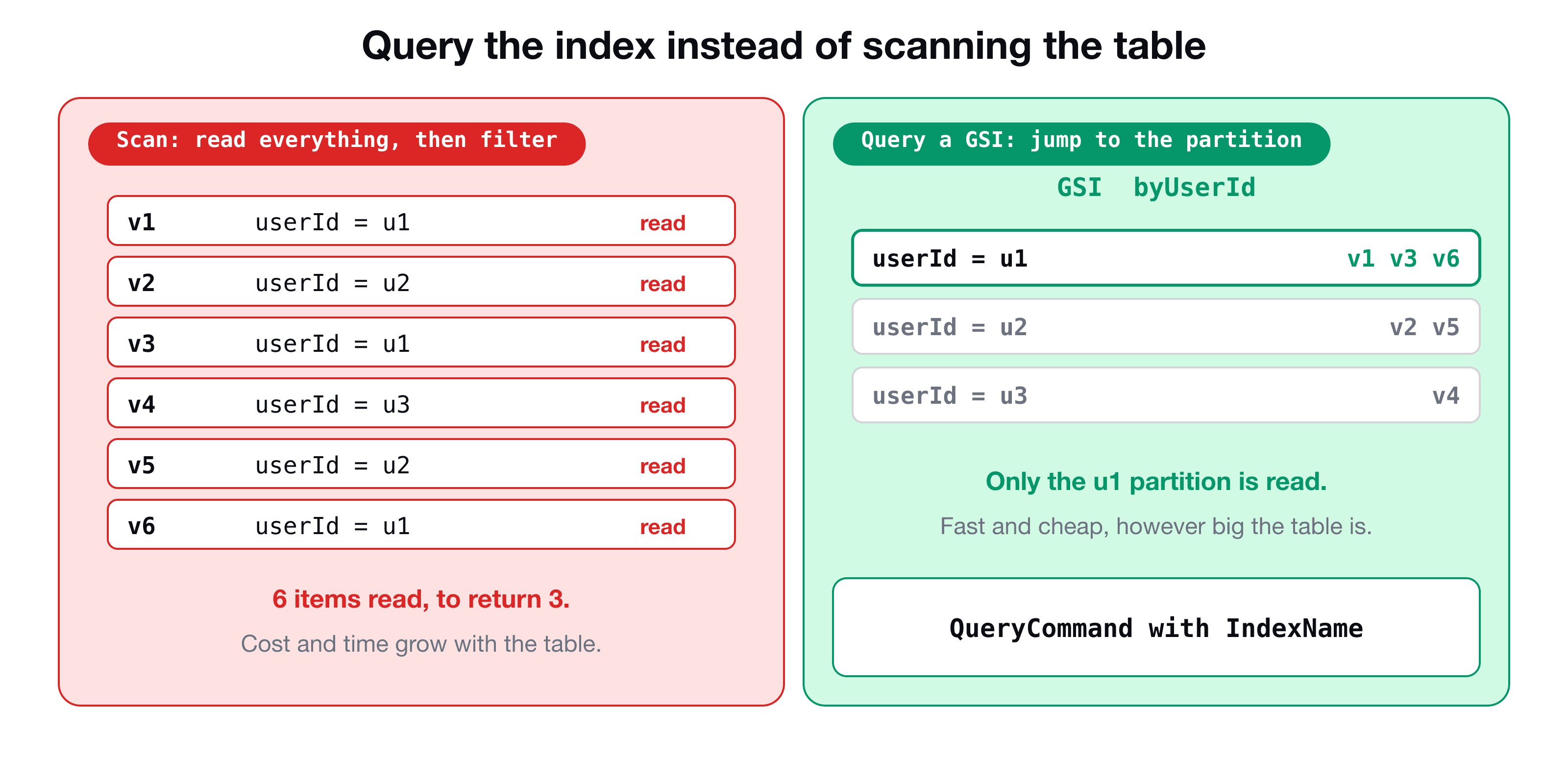
A Scan reads (and bills you for) every item, then filters. It is fine for a tiny table and slows down and costs more as the table grows. A Query states the key you want, so DynamoDB only touches the items in that partition. That is the whole reason indexes exist.
The index
Here is the index from the course's table (defined in CDK):
table.addGlobalSecondaryIndex({
  indexName: "byUserId",
  partitionKey: { name: "userId", type: dynamodb.AttributeType.STRING },
  sortKey: { name: "uploadedTime", type: dynamodb.AttributeType.NUMBER },
});
Items with a userId appear in byUserId, grouped by user and sorted by uploadedTime. You can also read the index name from the table's page in the AWS console.
The QueryCommand
Query looks like UpdateItem: a condition expression, plus aliases for names and values.
import { QueryCommand } from "@aws-sdk/lib-dynamodb";
import { docClient } from "../lib/dynamo-client";

export const queryByUserId = async (userId: string) => {
  const response = await docClient.send(
    new QueryCommand({
      TableName: process.env.VIDEO_TABLE_NAME,
      IndexName: "byUserId",
      KeyConditionExpression: "#userId = :userId",
      ExpressionAttributeNames: { "#userId": "userId" },
      ExpressionAttributeValues: { ":userId": userId },
      ScanIndexForward: false,
    }),
  );

  return response.Items ?? [];
};| Parameter | Meaning |
|---|---|
IndexName | Which index to query. Leave it out and you query the table itself |
KeyConditionExpression | The condition on the key: partition key = a value, optionally with a sort key condition |
ExpressionAttributeNames | Aliases for attribute names (#userId), so reserved words never bite |
ExpressionAttributeValues | The values (:userId) |
ScanIndexForward | true (default) sorts by the sort key ascending, false gives newest first |
The response has Items (an array), Count, and, importantly, LastEvaluatedKey. Note the name: it is Items, plural, whereas GetCommand returns a single Item.
A Query must specify the partition key with =. You cannot query "userId begins with u" or "all items where title contains cat". For those questions, you need another index or a search engine such as OpenSearch.
A sort key condition
Because the index has a sort key, you can narrow by time:
KeyConditionExpression: "#userId = :userId AND #uploadedTime > :since",
ExpressionAttributeNames: { "#userId": "userId", "#uploadedTime": "uploadedTime" },
ExpressionAttributeValues: { ":userId": userId, ":since": Date.now() - 7 * 24 * 60 * 60 * 1000 },
That returns only this week's videos for the user, efficiently.
Pagination: do not forget it
A single query returns at most 1 MB of data (or your Limit). If there is more, the response contains LastEvaluatedKey. Pass it back as ExclusiveStartKey to get the next page:
export const queryAllByUserId = async (userId: string) => {
  const items: Record<string, unknown>[] = [];
  let lastKey: Record<string, unknown> | undefined;

  do {
    const page = await docClient.send(
      new QueryCommand({
        TableName: process.env.VIDEO_TABLE_NAME,
        IndexName: "byUserId",
        KeyConditionExpression: "#userId = :userId",
        ExpressionAttributeNames: { "#userId": "userId" },
        ExpressionAttributeValues: { ":userId": userId },
        ExclusiveStartKey: lastKey,
      }),
    );
    items.push(...(page.Items ?? []));
    lastKey = page.LastEvaluatedKey;
  } while (lastKey);

  return items;
};
For an API, you will often return one page at a time (with Limit) and send the LastEvaluatedKey to the client as a cursor instead of looping.
Put the query where it belongs
Keep database code behind a class, so handlers stay simple and tests can replace it. Here the base class exposes a generic index query, and the entity class adds an intention-revealing method:
export abstract class Db<T> {
  constructor(protected tableName: string) {}

  protected async queryByIndex(
    indexName: string,
    keyCondition: string,
    names: Record<string, string>,
    values: Record<string, unknown>,
  ): Promise<T[]> {
    const response = await docClient.send(
      new QueryCommand({
        TableName: this.tableName,
        IndexName: indexName,
        KeyConditionExpression: keyCondition,
        ExpressionAttributeNames: names,
        ExpressionAttributeValues: values,
      }),
    );
    return (response.Items ?? []) as T[];
  }
}

export class VideoDb extends Db<Video> {
  getByUserId(userId: string) {
    return this.queryByIndex("byUserId", "#userId = :userId", { "#userId": "userId" }, { ":userId": userId });
  }
}
The index name is hard-coded here for clarity. In a real project it should come from configuration, such as an environment variable set by CDK, as in Connect Lambda to DynamoDB.
Wire it into the API
A GET /video handler can now serve both ?id= and ?userId=. With the validation wrapper from validating API Gateway requests with Zod:
handler: async ({ query }) => {
  if (query.id) return videoDb.getById(query.id);
  return videoDb.getByUserId(query.userId!);
},
Test it without DynamoDB
Spy on the query method and check what the handler asked for, as in the Jest spy guide:
it("returns the videos of a user", async () => {
  const spyQuery = jest.spyOn(VideoDb.prototype, "getByUserId").mockResolvedValue([]);
  const spyGet = jest.spyOn(VideoDb.prototype, "getById");

  await handler({ httpMethod: "GET", queryStringParameters: { userId: "user-123" } } as any, {} as any, () => {});

  expect(spyGet).not.toHaveBeenCalled();
  expect(spyQuery).toHaveBeenCalledTimes(1);
  expect(spyQuery).toHaveBeenCalledWith("user-123");
});
It checks that the handler took the right branch: with a userId it queries the index and does not do a single-item lookup.
Key takeaways
- ✓To find items by a non-key attribute, add a GSI and use QueryCommand with IndexName, not Scan.
- ✓A query needs KeyConditionExpression with the partition key. Alias names with # and values with :.
- ✓Items is the array, ScanIndexForward: false sorts newest first.
- ✓A query returns up to 1 MB. Follow LastEvaluatedKey with ExclusiveStartKey for the next page.
- ✓Wrap queries in a database class so handlers stay thin and tests can spy on it.
Build the whole API
VidShare: Build a Video Streaming Platform on AWS builds this API step by step: DynamoDB with its index, Lambda handlers with Zod validation and tests, CDK, S3, MediaConvert and OpenSearch. 109 lessons, lifetime access, and three lessons are free to watch.