
CDK can describe almost everything about your AWS infrastructure: a DynamoDB table with its indexes, a Lambda with its environment variables, an API with its routes. You run cdk deploy, and it all exists.
Then you add something CDK has no construct for, such as an index inside an OpenSearch domain, and the story breaks: deploy the stack, open Postman or the dashboard, create the index by hand, then use the resources. Destroy the stack tomorrow, redeploy next week, and you have to remember to do the manual step again.
A custom resource closes that gap. It lets your own code run as part of the deployment.
The idea
A normal deployment is: deploy the stack, configure resources, use them, destroy the stack. For most services the configuration step is part of the stack. For some, it is not, and it becomes manual work.
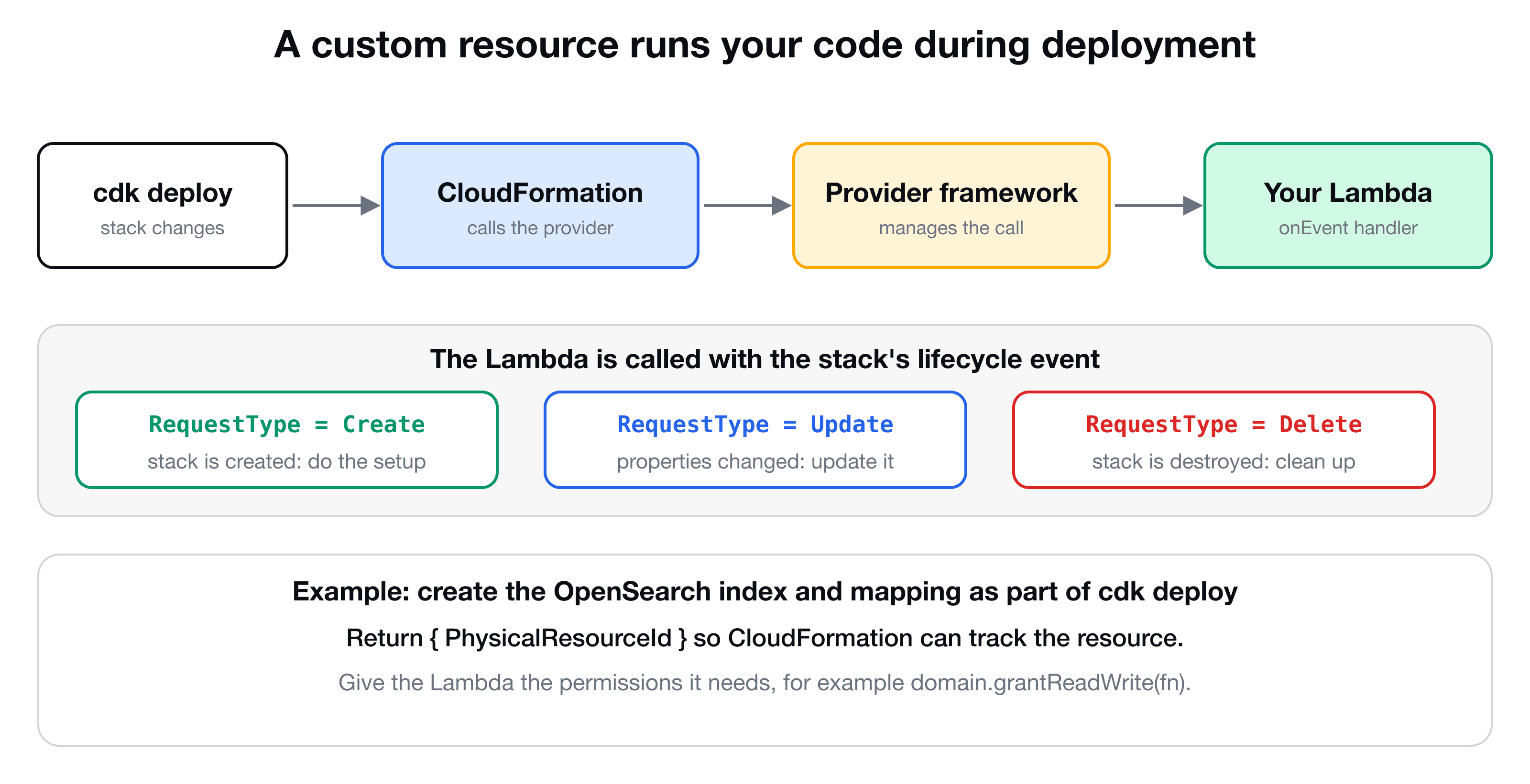
A custom resource is a resource in your stack whose create, update and delete are handled by a Lambda function you write. During cdk deploy, CloudFormation calls that function with an event that says which of the three is happening, with the properties you configured. CDK ships a helper, the provider framework, that handles the CloudFormation protocol for you (including reporting success or failure back), so your Lambda only has to do the work and return a result.
The pieces are:
| Piece | What it is |
|---|---|
| Handler Lambda | Your code, called with Create, Update or Delete |
Provider (custom-resources.Provider) | The framework that wraps your Lambda and talks to CloudFormation |
CustomResource (cdk.CustomResource) | The resource in your stack that uses the provider's serviceToken and your properties |
The handler
The handler receives an event with a RequestType and the ResourceProperties you passed. Here it creates an OpenSearch index when the stack is created:
// lambdas/opensearch-index.ts
import type { CdkCustomResourceHandler } from "aws-lambda";
import { createOpenSearchClient } from "../lib/opensearch-client";

export const handler: CdkCustomResourceHandler = async (event) => {
  const { endpoint, region, indexName, indexProperties } = event.ResourceProperties;

  if (event.RequestType === "Create") {
    const client = createOpenSearchClient(endpoint, region);
    await client.indices.create({
      index: indexName,
      body: { mappings: { properties: indexProperties } },
    });
  }

  return { PhysicalResourceId: indexName };
};
Two things to know:
PhysicalResourceIdis the identity of the thing you created. CloudFormation stores it, and uses it to track the resource across updates. Returning a different id on anUpdatetells CloudFormation that the resource was replaced, and it will then send aDeletefor the old one. Return a stable id for a resource that should stay the same.- The framework expects the handler to return an object (or throw an error to mark the deployment as failed). For
UpdateandDeleteyou decide what to do: re-apply a mapping, delete the index, or nothing. This example handles onlyCreate, as is typical for a resource that you create once.
(The client uses signed requests; see How AWS credentials work.)
The stack
In the stack, create the handler function, wrap it in a provider, and declare the custom resource with its properties:
import * as cdk from "aws-cdk-lib";
import * as cr from "aws-cdk-lib/custom-resources";
import { NodejsFunction } from "aws-cdk-lib/aws-lambda-nodejs";

const indexCreator = new NodejsFunction(this, "OpensearchIndexCreator", {
  entry: "lambdas/opensearch-index.ts",
  timeout: cdk.Duration.minutes(2),
});

domain.grantReadWrite(indexCreator);   // permission to talk to the domain

const provider = new cr.Provider(this, "OpensearchIndexProvider", {
  onEventHandler: indexCreator,
});

const videoIndex = new cdk.CustomResource(this, "VideoIndex", {
  serviceToken: provider.serviceToken,
  properties: {
    endpoint: `https://${domain.domainEndpoint}`,
    region: this.region,
    indexName: "video",
    indexProperties: {
      userId: { type: "keyword" },
      title: { type: "text" },
      description: { type: "text" },
      tags: { type: "text" },
    },
  },
});
What each part does:
onEventHandleris your Lambda. The provider also accepts an optionalisCompleteHandlerfor long-running work: it is called repeatedly until the job reports completion, which suits things that take minutes.serviceTokenconnects theCustomResourceto the provider.propertiesbecomeevent.ResourceProperties. Readingdomain.domainEndpointin a property also makes CDK deploy the domain first, so the index creator never runs against a domain that does not exist yet. If a resource must wait without referencing it, usevideoIndex.node.addDependency(domain).- Changing a property makes CloudFormation send an
Updateevent on the next deploy. That is the hook for "re-apply this mapping".
The mapping above is the one from the OpenSearch mapping and Query DSL tutorial.
Permissions
The handler Lambda is an ordinary function with its own execution role, and it needs permission to do its job. For the OpenSearch domain, domain.grantReadWrite(indexCreator) adds what it needs. Forgetting this gives a 403 inside the custom resource, and the stack deployment fails and rolls back with the error from your Lambda in the events.
Check that it worked
After cdk deploy, open the OpenSearch Dashboards (or call the domain from Postman) and look at the indices. You should see the video index with its mapping. (You will also see indices OpenSearch creates for itself, such as the dashboard's.) Destroy and redeploy the stack, and the index returns, with no manual step.
When to reach for something simpler
If you only need to call one AWS API during deployment, such as "start this job" or "put this parameter", CDK has AwsCustomResource, which calls an SDK method for you, with no Lambda to write. Use your own provider (as here) when you need logic: a non-AWS endpoint such as OpenSearch's REST API, retries, or several steps.
Debugging tips
- Deployments can wait on a custom resource for a long time when the handler fails without reporting. The provider framework avoids the worst of that, but set a sensible Lambda timeout.
- Look at the handler's CloudWatch logs first. Add a
console.log(JSON.stringify(event))at the top while you build it. - A failed
Createrolls the stack back. A failedDeletecan leave a stack stuck in a delete-failed state, so keepDeletehandlers tolerant (for example, ignore "index not found").
Key takeaways
- ✓A custom resource runs your Lambda during deployment, on Create, Update and Delete.
- ✓Use cr.Provider with your onEventHandler, and a CustomResource with the provider's serviceToken and your properties.
- ✓Return a PhysicalResourceId. A different id on Update means the resource was replaced.
- ✓Grant the handler Lambda the permissions it needs, or the deploy fails and rolls back.
- ✓For a single SDK call with no logic, AwsCustomResource needs no Lambda at all.
Automate the last manual step
VidShare: Build a Video Streaming Platform on AWS ends with a fully automated deployment: the OpenSearch domain, the index created by a custom resource, and Lambdas that index and search, all from one cdk deploy. 109 lessons, lifetime access, and three lessons are free to watch.