
Your Lambda receives a request, and now it needs to save something in DynamoDB. It looks like one line of code, but three separate things must line up before that line works: the code, the configuration and the permission. Miss one, and you get a different, confusing error.
This guide covers all three with the AWS SDK for JavaScript v3 and TypeScript, using a video table as the example.
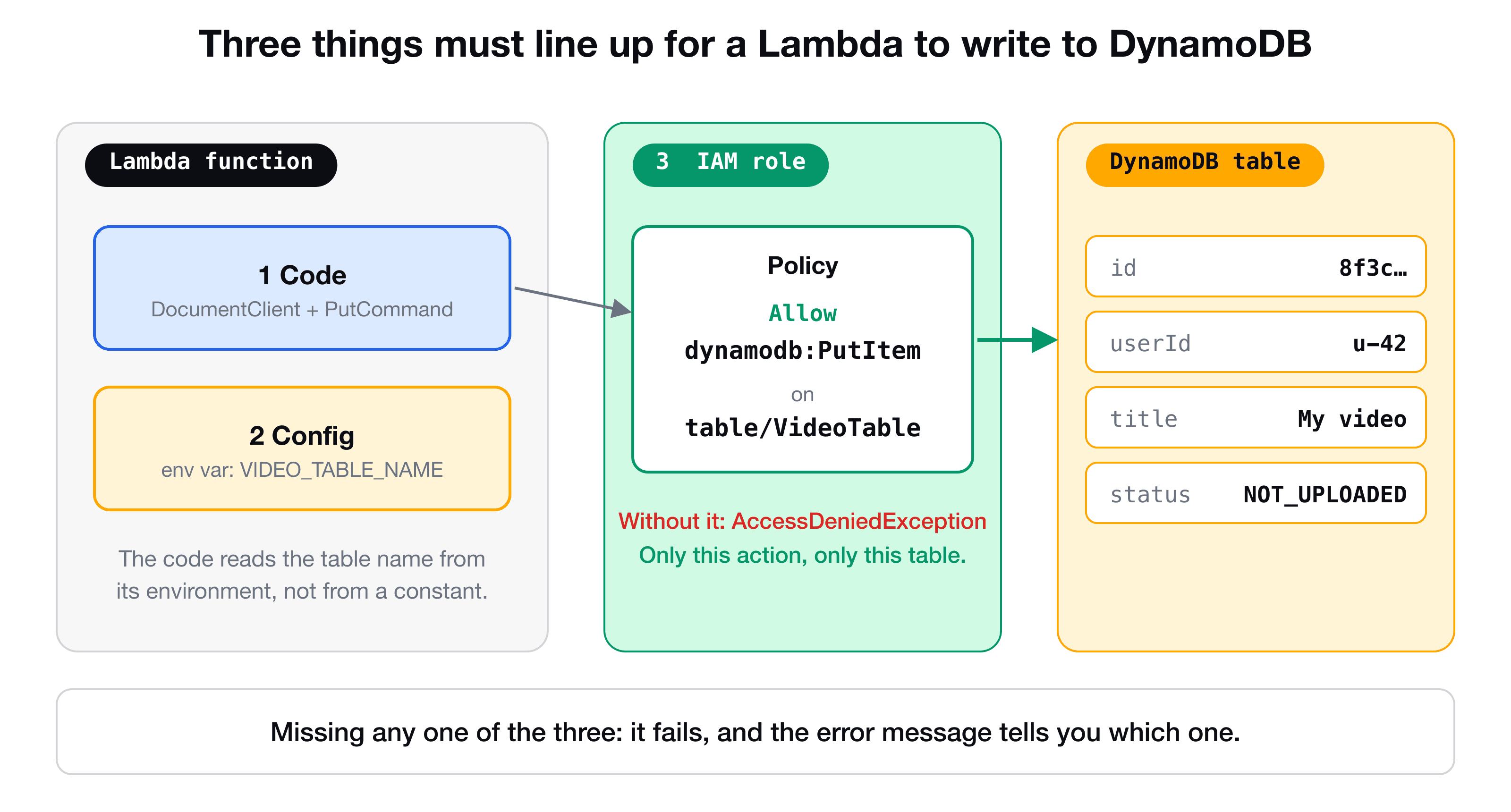
1. The code: SDK v3 and the document client
Always use version 3 of the SDK. It is modular, so you install only the services you need, and the code examples live in the AWS SDK for JavaScript v3 developer guide, which is worth bookmarking.
npm install @aws-sdk/client-dynamodb @aws-sdk/lib-dynamodb
npm install -D @types/aws-lambda
There are two packages on purpose:
@aws-sdk/client-dynamodbis the low-level client. Every value must carry its DynamoDB type, so a title looks like{ title: { S: "My video" } }and a list of tags like{ tags: { L: [{ S: "aws" }] } }.@aws-sdk/lib-dynamodbis the document client built on top of it. You pass plain JavaScript objects, and it converts them (the technical word is marshalling).
Unless you need the low-level details, use the document client:
// lib/dynamo-client.ts
import { DynamoDBClient } from "@aws-sdk/client-dynamodb";
import { DynamoDBDocumentClient } from "@aws-sdk/lib-dynamodb";

const client = new DynamoDBClient({}); // inside Lambda, the region comes from AWS_REGION

export const docClient = DynamoDBDocumentClient.from(client, {
  marshallOptions: { removeUndefinedValues: true },
});
And saving an item:
import { PutCommand } from "@aws-sdk/lib-dynamodb";
import { docClient } from "../lib/dynamo-client";

await docClient.send(
  new PutCommand({
    TableName: process.env.VIDEO_TABLE_NAME,
    Item: { id: "8f3c", userId: "u-42", title: "My video", status: "NOT_UPLOADED" },
  }),
);
You call send on the client with a command object. Every operation in SDK v3 works that way, so GetCommand, QueryCommand and DeleteCommand all look the same. (A query on a global secondary index is shown in DynamoDB data modeling explained.)
The undefined gotcha
Optional fields (a description, a list of tags) are often undefined. DynamoDB has no such value, and the document client refuses it:
Pass options.removeUndefinedValues=true to remove undefined values from map/array/set.
That is why the client above was created with marshallOptions: { removeUndefinedValues: true }. With it, the missing fields are simply left out of the item. Without it, a request that omits description fails with a 500.
Describe your item once, with Zod
Instead of an interface that can drift from reality, define the entity as a Zod schema and infer the type from it:
// entity/video.ts
import { z } from "zod";

export const videoSchema = z.object({
  id: z.string(),
  userId: z.string(),
  title: z.string(),
  description: z.string().optional(),
  uploadedTime: z.number(), // a timestamp
  tags: z.array(z.string()).optional(),
  status: z.enum(["NOT_UPLOADED", "UPLOADED", "PROCESSING", "READY"]),
});

export type Video = z.infer<typeof videoSchema>;
Now const video: Video = { id: crypto.randomUUID(), userId, title, uploadedTime: Date.now(), status: "NOT_UPLOADED" } is checked by the compiler, and status can only be one of the four values. The same schema can validate incoming requests, as shown in validating API Gateway requests with Zod.
2. The configuration: environment variables, typed
The Lambda must know which table to write to. Hard-coding a name works until you deploy a second environment. The better way is an environment variable on the function, set by your infrastructure code, which in CDK looks like this:
const putHandler = new NodejsFunction(this, "PutVideoHandler", {
  entry: "lambdas/put-video/handler.ts",
  environment: {
    VIDEO_TABLE_NAME: table.tableName,
    UPLOAD_BUCKET_NAME: uploadBucket.bucketName,
  },
});
Inside the handler these arrive as process.env.VIDEO_TABLE_NAME. The trap is that process.env is not typed: write process.env.VIDEO_TABLE_NEM with a typo, or video_table_name in a different case, and TypeScript says nothing. You find out at runtime, in production.
The fix is a shared type that both the stack and the handler import:
// lib/lambda-env.ts
export type PutHandlerEnv = {
  VIDEO_TABLE_NAME: string;
  UPLOAD_BUCKET_NAME: string;
};
// in the CDK stack
import type { PutHandlerEnv } from "../lib/lambda-env";
const putHandlerEnv: PutHandlerEnv = {
VIDEO_TABLE_NAME: table.tableName,
UPLOAD_BUCKET_NAME: uploadBucket.bucketName,
};
// ...new NodejsFunction(..., { environment: putHandlerEnv })// in the handler
import type { PutHandlerEnv } from "../../lib/lambda-env";
const env = process.env as PutHandlerEnv;
await docClient.send(new PutCommand({ TableName: env.VIDEO_TABLE_NAME, Item: video }));Now a typo on either side is a compile error, and autocomplete lists the variables for you. If you add a variable to the type, the stack will not compile until you provide it.
For your Jest tests, the variable is not set, so use fallbacks such as process.env.VIDEO_TABLE_NAME ?? "test-table" where you read it, or set it in the test setup.
3. The permission: least-privilege IAM
By default a Lambda's execution role can write logs, and nothing else. Without a permission statement, the call fails with a clear message:
AccessDeniedException: User: arn:aws:sts::123456789012:assumed-role/PutVideoHandlerRole/...
is not authorized to perform: dynamodb:PutItem on resource: arn:aws:dynamodb:us-east-1:123456789012:table/VideoTable
It names the action (dynamodb:PutItem) and the resource (the table ARN). That is the permission to add. If you do it by hand in the console, add an inline policy to the function's role: service DynamoDB, only the PutItem action, and only your table's ARN. The visual editor tends to add extra statements (reserved capacity, for example), so open the JSON and delete everything you do not need.
In CDK you never write that JSON yourself:
table.grantWriteData(putHandler);grantWriteData creates the policy for you and attaches it to the function's role, with the table ARN filled in. It grants the write actions (PutItem, UpdateItem, DeleteItem and the batch variants). If you want to give less, add a statement for just the action you need:
putHandler.addToRolePolicy(
  new iam.PolicyStatement({ actions: ["dynamodb:PutItem"], resources: [table.tableArn] }),
);
The habit to build is least privilege: only the actions the function needs, only on the resources it uses.
Put it together
import { PutCommand } from "@aws-sdk/lib-dynamodb";
import { docClient } from "../../lib/dynamo-client";
import type { PutHandlerEnv } from "../../lib/lambda-env";
import type { Video } from "../../entity/video";

const env = process.env as PutHandlerEnv;

export const createVideo = async (input: Pick<Video, "userId" | "title" | "description" | "tags">) => {
  const video: Video = {
    ...input,
    id: crypto.randomUUID(),
    uploadedTime: Date.now(),
    status: "NOT_UPLOADED",
  };
  await docClient.send(new PutCommand({ TableName: env.VIDEO_TABLE_NAME, Item: video }));
  return video;
};Key takeaways
- ✓Three things must line up: the code, the configuration (table name) and the IAM permission.
- ✓Use @aws-sdk/lib-dynamodb for plain JavaScript objects, and set marshallOptions.removeUndefinedValues to true so optional fields do not crash.
- ✓Define the item as a Zod schema and infer the TypeScript type from it.
- ✓Pass the table name as an environment variable, and share a TypeScript type between the stack and the handler so typos fail at compile time.
- ✓Grant the least permission needed. In CDK, table.grantWriteData(fn) does it in one line.
Build the whole thing, end to end
VidShare: Build a Video Streaming Platform on AWS walks through every one of these steps while building a complete video platform: API Gateway, Lambda, DynamoDB, S3, MediaConvert, OpenSearch and CDK, with tests along the way. 109 lessons, lifetime access, and three lessons are free to watch.