
DynamoDB tables are cheap to create and expensive to get wrong. The keys decide which questions you can ask quickly, and changing a table's primary key later means creating a new table and moving the data.
NoSQL Workbench is AWS's free desktop app for designing a table before you build it. You define keys and indexes, add sample items, and see how every query would see your data. If you have used MongoDB Compass, it is the same idea for DynamoDB.
Install and open it
NoSQL Workbench is in the Amazon DynamoDB developer guide (search "NoSQL Workbench download"), and it is available for macOS, Windows and Linux. Install it, open it, and on the welcome screen choose Amazon DynamoDB and launch the Data modeler.
A data model is a collection of tables. An e-commerce app may have a users table, an orders table and a products table, and all of them make up one data model.
Explore a sample model first
Workbench ships with example models. Import the Employee data model to see the screens before building your own. The model lists its tables, and each table has:
- a primary key: here
loginAlias, a string, as the partition key, with no sort key - other attributes
- global secondary indexes (GSIs): a
nameindex (partition keyfirstName, sort keylastName) and adirectReportsindex (partition keymanagerLoginAlias)
Open the JSON view to see the same table as JSON, then switch to the visualizer. It draws the table with sample data, and you can click a GSI to see the same data in the index's orientation.
Two details worth noticing in the sample:
- Items without the index key are not in the index. Some employees have no
managerLoginAlias, so they simply do not appear in thedirectReportsGSI. This is useful: an index can hold only the items that have the attribute. - A GSI does not need to be unique. In the main table, the primary key must identify exactly one item. In a GSI the keys can repeat, so several employees can share a first name, and the sort key only orders them.
Build the VidShare video table
Now create your own model. Choose Create new data model, name it (for example VidShare data model), and add a table.
1. The table and its primary key
| Setting | Value |
|---|---|
| Table name | video |
| Partition key | id (String) |
| Sort key | none |
The id identifies one video, so a partition key alone is enough, and looking up a video by its id is the fastest query DynamoDB offers.
2. A few attributes
Add the attributes you know you need as non-key attributes: userId (String) and uploadedTime (Number). DynamoDB is schemaless, so you do not have to list every attribute, and you can add more later. We list these two because the index will use them.
3. A global secondary index
The question the app must answer is "show me all videos of this user". The main table can only be queried by id, so add a GSI:
| Setting | Value |
|---|---|
| Index name | videoByUser |
| Partition key | userId (String) |
| Sort key | uploadedTime (Number) |
| Projection type | All |
Projection decides which attributes DynamoDB copies into the index:
- All: every attribute. Queries on the index return the full item. Uses more storage.
- Keys only: just the keys (here
id,userIdanduploadedTime). Cheapest, but you only get keys back and must fetch the rest from the main table. - Include: the keys plus the attributes you list.
For a small table, All is the simple, correct choice.
4. Capacity
Choose on-demand capacity. With on-demand you do not forecast traffic: you pay per request. It is the sensible starting point when you do not know how many users you will have. The index inherits the capacity settings of the table.
Click Add table definition. The model now has one table with one index.
Add sample data and look at it
Open the Visualizer and add a few items. For the timestamp, use the number you get from Date.now() in a JavaScript console. It counts milliseconds since 1 January 1970:
| id | userId | uploadedTime |
|---|---|---|
| video1 | user1 | 300 |
| video2 | user2 | 100 |
| video3 | user1 | 200 |
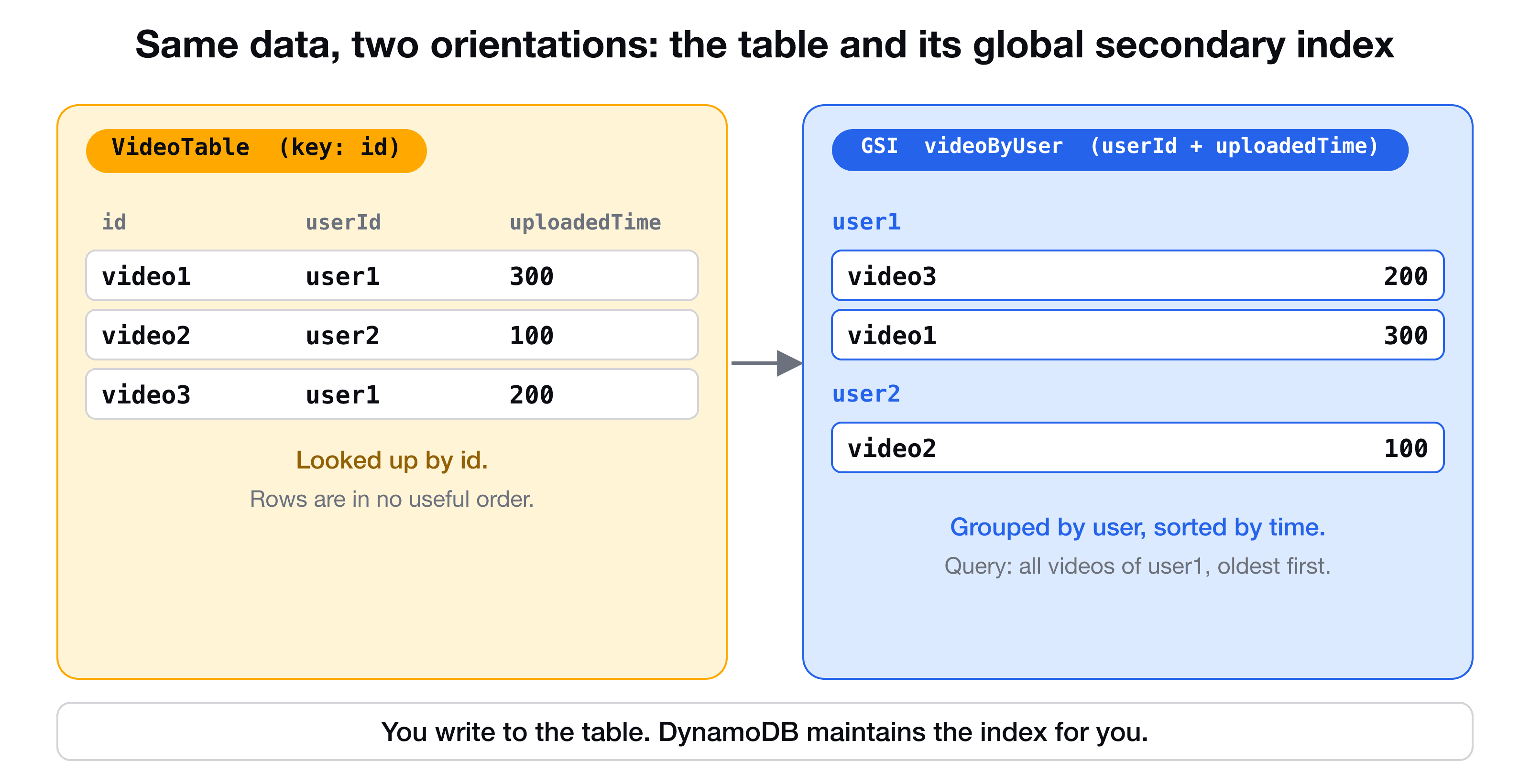
Click the table, and you see the three videos keyed by id. Click the videoByUser index, and the same items are grouped by userId and sorted by uploadedTime: user1 has video3 then video1, and user2 has video2. That is exactly the order a query for "this user's videos" returns, which is the proof that the index answers your question.
From model to a real table
Workbench can create the table in your AWS account (look for the option to commit the model to DynamoDB, after connecting your credentials), and its Operation builder can run queries against it and generate sample code.
In a real project, though, the table should be defined as code, so it can be reviewed and redeployed. The VidShare course uses Workbench for the design step, then builds the table and index with CDK. The code that queries the index from a Lambda is shown in DynamoDB data modeling explained, and writing to the table from TypeScript in Connect Lambda to DynamoDB.
Key takeaways
- ✓NoSQL Workbench lets you design keys and indexes and see sample data before you write code.
- ✓Items that lack an index key do not appear in that index. GSI keys do not have to be unique.
- ✓Create a GSI per extra access pattern: here videoByUser with partition key userId and sort key uploadedTime.
- ✓Projection controls what is copied to the index: All, Keys only, or Include.
- ✓On-demand capacity is a safe starting point when traffic is unknown. Use camelCase attribute names.
Learn data modeling by building a real system
VidShare: Build a Video Streaming Platform on AWS starts the database with exactly this design process: entities, access patterns, the Workbench model, then the table in CDK and the code that uses it. 109 lessons, lifetime access, and three lessons are free to watch.