
PutItem is the first DynamoDB call everyone learns, and it is the wrong tool for half of real-world writes. When a Lambda reacts to an event ("the video file just landed in S3, mark it as uploaded"), it knows an id and one or two fields. It does not have the whole document. That is what UpdateItem is for.
Its syntax, though, looks strange the first time: strings like SET #status = :status, plus two extra objects full of # and : keys. This post explains why they exist, then builds a small, typed update helper and uses it in an S3-triggered Lambda.
PutItem replaces, UpdateItem patches
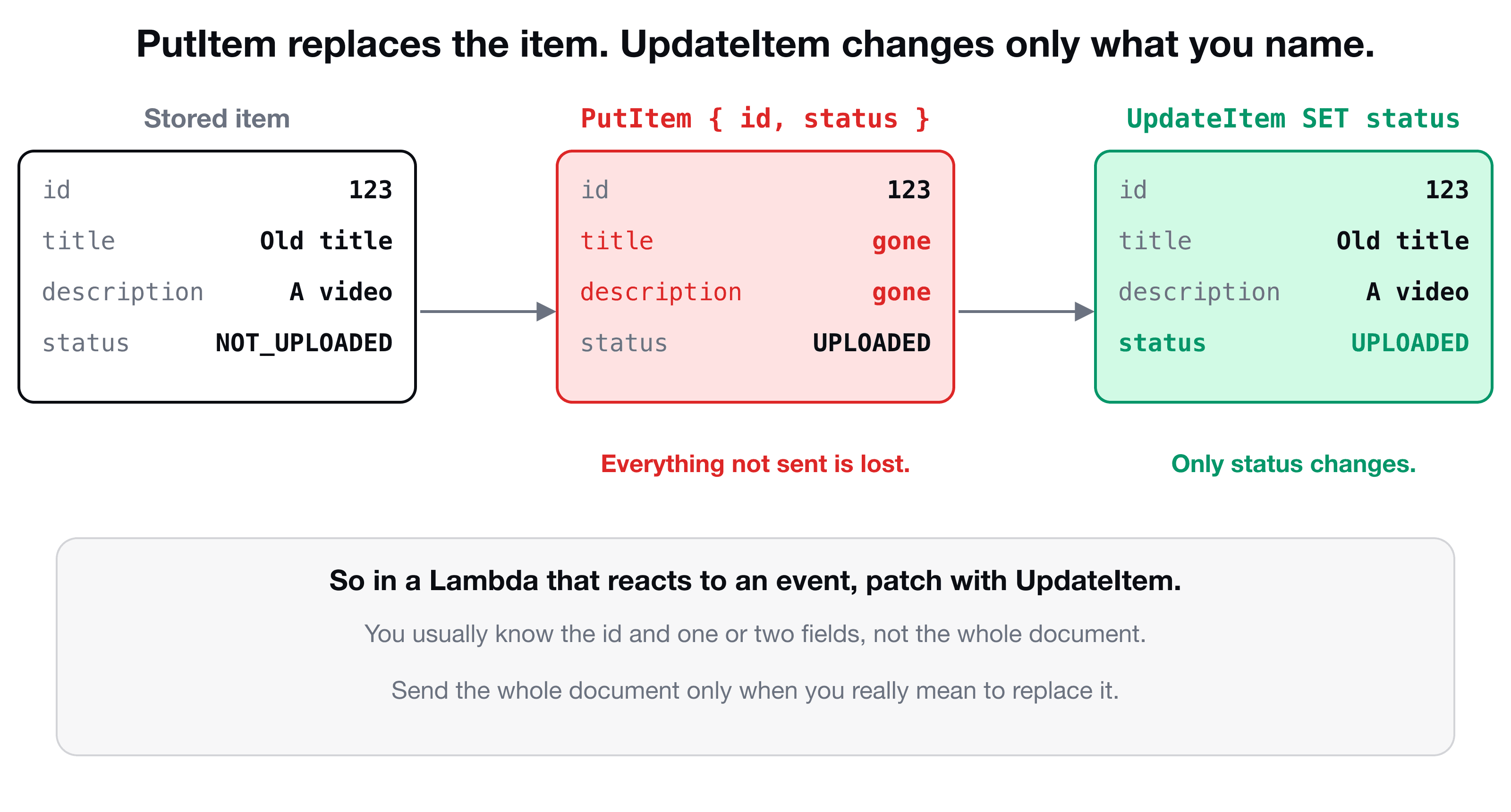
PutItem writes the whole item. If an item with that key already exists, it is replaced, and any attribute you did not include is gone. UpdateItem finds the item by its key and changes just the attributes in your update expression, leaving the rest alone.
The anatomy of an UpdateCommand
With the document client (see Connect Lambda to DynamoDB for the setup), changing one field looks like this:
import { UpdateCommand } from "@aws-sdk/lib-dynamodb";

await docClient.send(
  new UpdateCommand({
    TableName: process.env.VIDEO_TABLE_NAME,
    Key: { id: "123" },
    UpdateExpression: "SET #status = :status",
    ExpressionAttributeNames: { "#status": "status" },
    ExpressionAttributeValues: { ":status": "UPLOADED" },
  }),
);| Part | What it does |
|---|---|
TableName | Which table |
Key | The primary key of the item to change (partition key, plus sort key if the table has one) |
UpdateExpression | What to do, written in DynamoDB's own mini-language |
ExpressionAttributeNames | Aliases for attribute names in the expression, written with # |
ExpressionAttributeValues | Aliases for the values, written with : |
The expression SET #status = :status reads: "set the attribute behind #status to the value behind :status". Multiple changes are separated by commas: SET #title = :title, #description = :description.
Why the # and : placeholders?
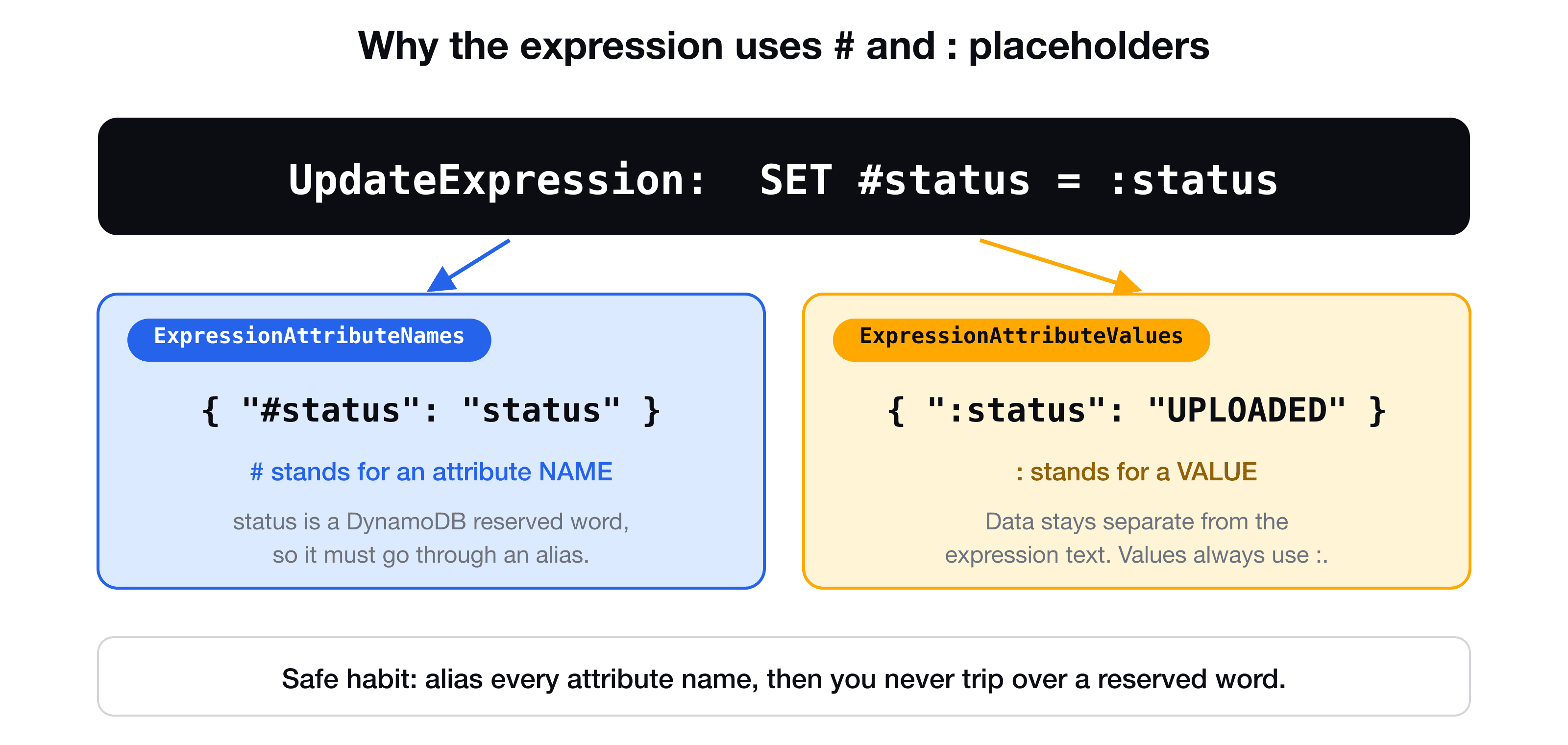
You could imagine writing SET status = "UPLOADED". It does not work, for two reasons.
Reserved words. DynamoDB has a list of words with a meaning in its expression language, and status, name, size, data, comment and many more are on it. Using one directly gives a validation error that mentions "reserved keyword". Aliasing the name (#status) avoids the clash. Notice that status is exactly what our video item uses.
Values stay data. A value is always passed as a placeholder (:status), never pasted into the string. The expression is a fixed piece of text, and the data travels beside it, which keeps characters in your data from being mixed up with the expression syntax.
The practical rule: always alias every attribute name. You never need to look up the reserved-word list, and you never get surprised when a new attribute happens to be on it.
Build the expression from an object
Writing these three strings by hand for every update is repetitive and easy to get wrong. A small helper can build them from a plain object of changes:
export const buildUpdate = (attributes: Record<string, unknown>) => {
  const entries = Object.entries(attributes).filter(([, value]) => value !== undefined);
  if (entries.length === 0) throw new Error("Nothing to update");

  return {
    UpdateExpression: "SET " + entries.map((_, i) => `#k${i} = :v${i}`).join(", "),
    ExpressionAttributeNames: Object.fromEntries(entries.map(([key], i) => [`#k${i}`, key])),
    ExpressionAttributeValues: Object.fromEntries(entries.map(([, value], i) => [`:v${i}`, value])),
  };
};
For { status: "UPLOADED", title: "New" } it produces SET #k0 = :v0, #k1 = :v1 with matching name and value maps. Each attribute gets a numbered alias, so any attribute name is safe.
Type it with a generic
You want update("123", { status: "UPLOADED" }) to autocomplete the attribute names and reject { staus: "UPLOADED" }. That is what a TypeScript generic is for: a type placeholder you fill in later. A generic function shows the idea:
const print = <T,>(value: T): T => value;
print(1);       // returns type number
print("hi");    // returns type string
The same trick works for a base database class. T is the type of the item the class stores:
export abstract class Db<T extends Record<string, unknown>> {
  constructor(protected tableName: string) {}

  async update(id: string, attributes: Partial<T>) {
    const u = buildUpdate(attributes);

    await docClient.send(
      new UpdateCommand({
        TableName: this.tableName,
        Key: { id },
        UpdateExpression: u.UpdateExpression,
        ConditionExpression: "attribute_exists(#id)",
        ExpressionAttributeNames: { ...u.ExpressionAttributeNames, "#id": "id" },
        ExpressionAttributeValues: u.ExpressionAttributeValues,
      }),
    );
  }
}

export class VideoDb extends Db<Video> {}
Partial<T> means "any subset of the item's attributes". With VideoDb extends Db<Video>, calling videoDb.update("123", { status: "UPLOADED" }) is checked against the real Video type from your Zod schema, and { staus: "UPLOADED" } is a compile error.
Why the condition
ConditionExpression: "attribute_exists(#id)" is a small guard worth having: UpdateItem creates the item if it does not exist. Without the condition, an update for an id that was never saved silently creates a stub item with only a status. With it, DynamoDB rejects the call with a ConditionalCheckFailedException, which you can turn into a 404.
Use it in an S3-triggered Lambda
The VidShare flow uploads a video straight to S3 with a presigned URL, using the video's id as the object key. When the upload finishes, S3 calls a Lambda. That handler knows the key (which equals the id), so it only needs to flip the status:
import type { S3Handler } from "aws-lambda";
import { VideoDb } from "../../entity/video-db";

const videoDb = new VideoDb(process.env.VIDEO_TABLE_NAME!);

export const handler: S3Handler = async (event) => {
  for (const record of event.Records) {
    const id = decodeURIComponent(record.s3.object.key.replace(/\+/g, " "));
    await videoDb.update(id, { status: "UPLOADED" });
  }
};
Two details are easy to miss. S3 delivers URL-encoded keys (spaces become +), so decode them before using the key as an id. And an event can contain several records, so loop instead of reading only the first. (What the event looks like, and how to wire the trigger with CDK, is covered in Trigger a Lambda on S3 upload.)
Test it test-first
Like any handler that talks to a database, this one is easiest to test by spying on the database method and checking what it was called with:
it("marks the video as uploaded", async () => {
  const mockUpdate = jest.spyOn(VideoDb.prototype, "update").mockResolvedValue();

  await handler(getEvent("test-bucket", "id-123") as any, {} as any, () => {});

  expect(mockUpdate).toHaveBeenCalledTimes(1);
  expect(mockUpdate.mock.calls[0][0]).toBe("id-123");
  expect(mockUpdate.mock.calls[0][1]).toEqual({ status: "UPLOADED" });
});
mock.calls[0][0] is the first argument of the first call, and [0][1] the second. The spying and mocking approach, including when not to mock, is explained in Test-driven development for AWS Lambda with Jest.
Key takeaways
- ✓PutItem replaces the whole item. UpdateItem changes only the attributes you name.
- ✓UpdateExpression says what to do, ExpressionAttributeNames aliases names with #, ExpressionAttributeValues aliases values with :.
- ✓Many everyday names (status, name, size) are reserved words, so alias every attribute name.
- ✓A small helper can build the three pieces from an object, and a generic base class types the attributes with Partial<T>.
- ✓UpdateItem creates a missing item. Add ConditionExpression: attribute_exists(...) so an unknown id fails instead.
Build the whole pipeline
VidShare: Build a Video Streaming Platform on AWS takes this handler from a failing test to a deployed S3-triggered Lambda, then continues into video processing with MediaInfo and MediaConvert. 109 lessons, lifetime access, and three lessons are free to watch.