
You have an OpenSearch domain and a few documents in it. Now you want "all videos about funny cats", and the first query returns nothing, or the wrong thing. Nine times out of ten the cause is the same: the mapping says one thing, and the query assumes another.
This tutorial fixes that. You will create an index with an explicit mapping, learn the difference between text and keyword once and for all, and then write the queries a real search page needs. (For the overall picture of how full-text search works and how to deploy it with CDK, see Full-text search on AWS with OpenSearch, Lambda and CDK.)
Where to run the examples
OpenSearch is a REST API, so you can use curl or Postman, but the quickest tool is Dev Tools in OpenSearch Dashboards (the browser UI of your domain). You type the HTTP method and path on the first line and the JSON body below it:
GET /
From outside the dashboard, the same request is a normal HTTP call to your domain endpoint, which must be signed or otherwise authorised. The examples below use the Dev Tools format.
An index and its mapping
An index is where documents live, like a table in a database. A mapping is its schema: which fields exist and what type each one has.
If you skip the mapping, OpenSearch guesses the types from the first document (dynamic mapping). A number becomes a number and a string becomes a text field. That is convenient for experiments. When you know your fields, create the index with an explicit mapping, so nothing is left to guesswork:
PUT /video
{
  "mappings": {
    "properties": {
      "userId":       { "type": "keyword" },
      "title":        { "type": "text" },
      "description":  { "type": "text" },
      "tags":         { "type": "text" },
      "status":       { "type": "keyword" },
      "uploadedTime": { "type": "long" }
    }
  }
}
Two details:
- You do not have to map an
id. Every document has an_id, which you choose when you index it. - There is no array type. A field like
tagscan hold one string or a list of strings, and you map it as the type of its items (texthere). That is whytagsis justtext.
text vs keyword
This is the concept everything else depends on.
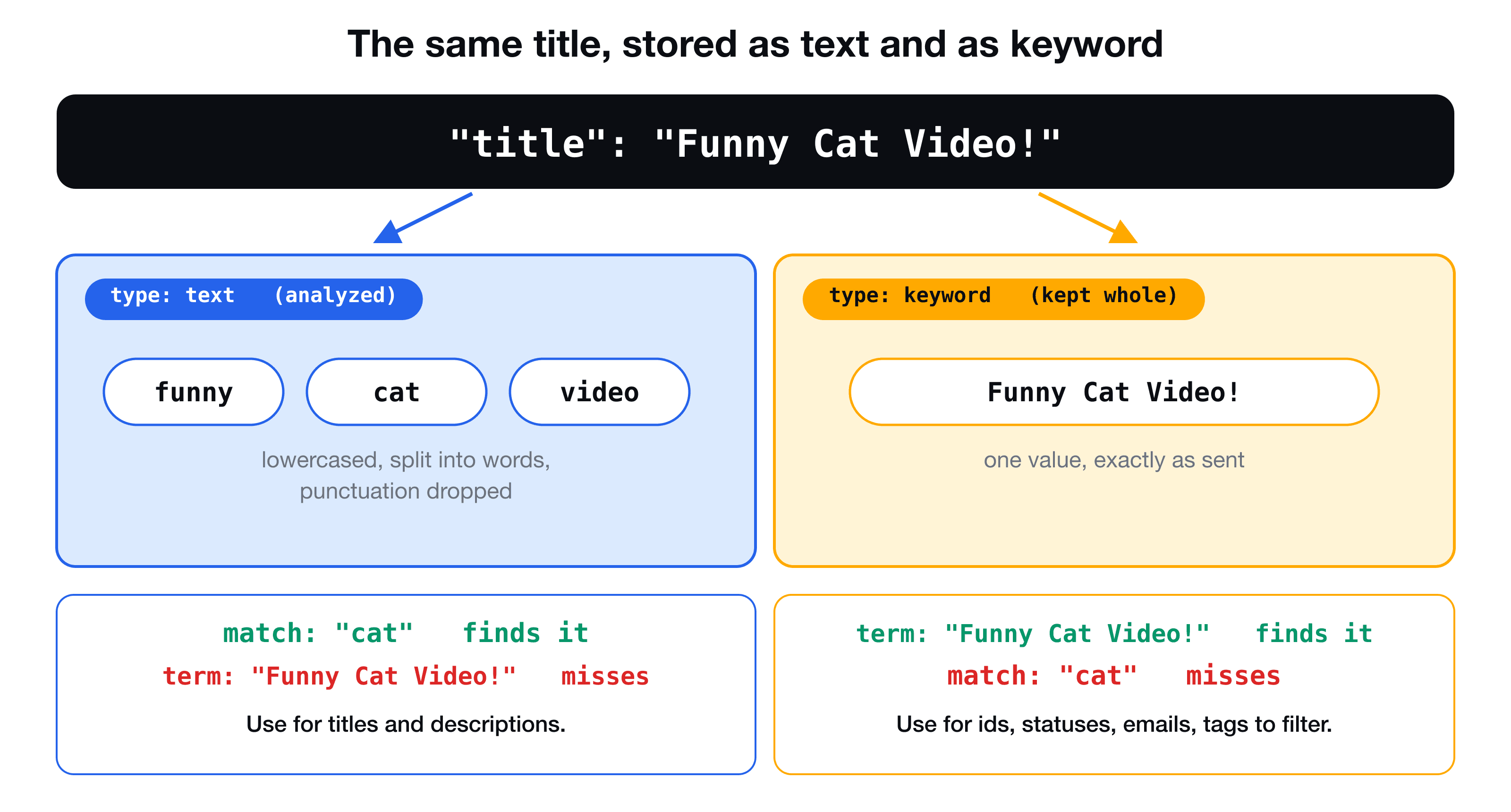
textis for natural language. OpenSearch analyzes it: lowercases it, splits it into words, and drops punctuation. "Funny Cat Video!" becomesfunny,cat,video. A search forcatfinds it.keywordis for values you compare exactly: ids, statuses, email addresses, codes. The whole string is stored as it is.
Rule of thumb: if a person would search it, make it text. If your code would filter by it, make it keyword.
Index a few documents
PUT /video/_doc/1
{
  "userId": "user-123",
  "title": "Funny cat video",
  "description": "My cat chases a laser pointer",
  "tags": ["cat", "funny"],
  "status": "READY",
  "uploadedTime": 1731400000000
}

PUT /video/_doc/2
{
  "userId": "user-456",
  "title": "Learn AWS Lambda",
  "description": "Serverless functions in TypeScript",
  "tags": ["aws", "lambda"],
  "status": "READY",
  "uploadedTime": 1731500000000
}
The Query DSL
The Query DSL (domain-specific language) is OpenSearch's query language: a JSON document with a top-level query key, sent to GET /<index>/_search. "Domain-specific" means it only means something inside OpenSearch.
Queries come in two families: full-text queries for text fields and term-level queries for exact values.
match: search one text field
GET /video/_search
{
  "query": {
    "match": { "description": "cat" }
  }
}
This returns document 1. The query text is analyzed with the same rules as the field, so Cat, CAT and cat all match. With several words, match finds documents that contain any of them, ranked by relevance. The long form takes an object, which unlocks options:
{
  "query": {
    "match": {
      "description": { "query": "laser cat", "operator": "and" }
    }
  }
}
"operator": "and" requires both words.
multi_match: search several fields
A search box should look in the title, the description and the tags at once. That is multi_match:
GET /video/_search
{
  "query": {
    "multi_match": {
      "query": "funny cat",
      "fields": ["title^2", "description", "tags"]
    }
  }
}
title^2 boosts matches in the title to count twice as much as the others. This is the single query a basic search page needs: whatever the user typed goes into query, and you list the fields.
term: an exact value
GET /video/_search
{
  "query": {
    "term": { "userId": "user-123" }
  }
}
term does no analysis. It compares the value you give with the stored value exactly, so it belongs on keyword fields. Using it on a text field is the classic mistake:
{ "query": { "term": { "title": "Funny cat video" } } }
This returns nothing, because the title is stored as the words funny, cat, video, not as that sentence. (Even "Funny" would miss: the stored word is lowercase.)
| Query | Field type | Use for |
|---|---|---|
match, multi_match | text | What a person searches for |
term, terms | keyword, numbers | Ids, statuses, exact filters |
Combine conditions with bool
Real searches mix both: "search for funny cat, but only READY videos, of this user". The bool query combines clauses:
GET /video/_search
{
  "query": {
    "bool": {
      "must": [
        { "multi_match": { "query": "funny cat", "fields": ["title^2", "description", "tags"] } }
      ],
      "filter": [
        { "term": { "status": "READY" } },
        { "term": { "userId": "user-123" } }
      ]
    }
  },
  "sort": [{ "uploadedTime": "desc" }],
  "from": 0,
  "size": 10
}
| Clause | Meaning | Affects ranking? |
|---|---|---|
must | Must match | Yes |
filter | Must match, yes or no | No, and it can be cached |
should | Nice to match | Yes |
must_not | Must not match | No |
Put the relevance part in must, and the exact conditions in filter. sort overrides the relevance order (here, newest first), and from and size give you paging.
Reading the response
{
  "hits": {
    "total": { "value": 1, "relation": "eq" },
    "hits": [
      {
        "_index": "video",
        "_id": "1",
        "_score": 3.2,
        "_source": { "userId": "user-123", "title": "Funny cat video" }
      }
    ]
  }
}
Your documents are in hits.hits[]._source, with the relevance in _score and the document id in _id.
Run it from a Lambda
In the VidShare backend, a GET /video?search=cat request becomes a multi_match query. With the signed client:
export const searchVideos = async (keyword: string) => {
  const response = await client.search({
    index: "video",
    body: {
      query: {
        bool: {
          must: [{ multi_match: { query: keyword, fields: ["title^2", "description", "tags"] } }],
          filter: [{ term: { status: "READY" } }],
        },
      },
    },
  });

  return response.body.hits.hits.map((hit: any) => ({ id: hit._id, ...hit._source }));
};
The API route validates that search is present, as described in validating requests with Zod, then calls this function. The filter on READY keeps videos that are still processing out of the results.
Key takeaways
- ✓Create the index with an explicit mapping when you know your fields. Mapping is the schema.
- ✓text is analyzed into words for searching. keyword is kept whole for exact matching and filtering.
- ✓Use match or multi_match on text fields, and term on keyword fields. term on a text field returns nothing.
- ✓bool combines clauses: relevance in must, exact conditions in filter. Add sort, from and size for ordering and paging.
- ✓Results are in hits.hits[]._source, ranked by _score.
Build the full search feature
VidShare: Build a Video Streaming Platform on AWS ends with this feature fully built: the OpenSearch domain from CDK, the index created at deploy time, a signed client, and Lambdas that index videos as they become ready and search them. 109 lessons, lifetime access, and three lessons are free to watch.