
Your first Lambda behind API Gateway probably looks like this: parse event.body, check a few fields by hand, do the work, return a response, and put a try/catch around everything. Your second Lambda needs the same thing. By the fifth, you have the same twenty lines copied five times, and each copy answers errors slightly differently.
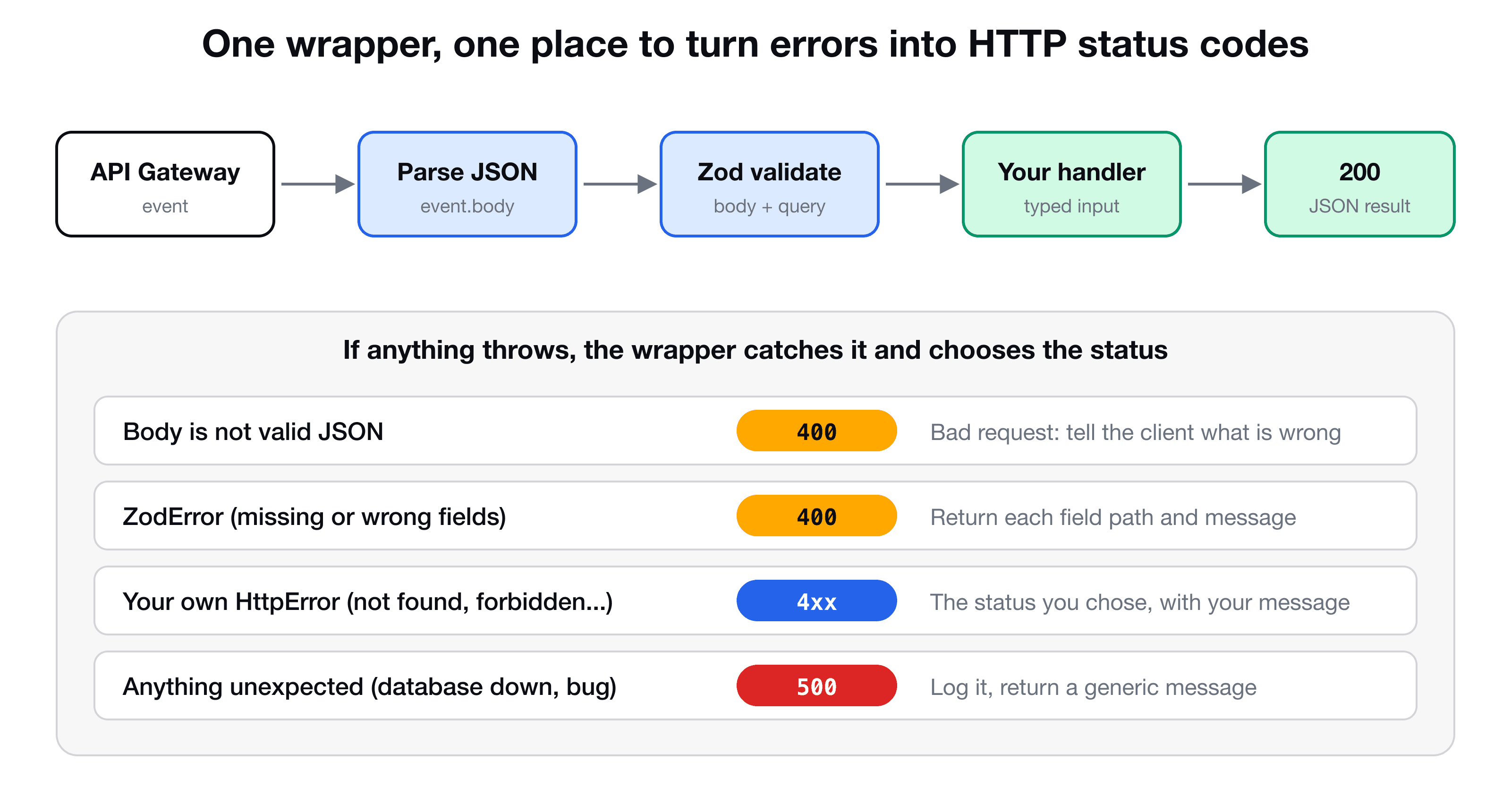
This post builds one small wrapper that every handler goes through. It parses and validates the request with Zod, gives your code a fully typed input, and returns the correct status code for each kind of failure.
(If you only want to see Zod used once, inside a test-driven refactor, that is in Test-driven development for AWS Lambda with Jest. This post takes that idea and makes it reusable.)
What a handler should and should not decide
A handler's real job is the business logic: save a video, return a list. These concerns do not belong in every handler:
- Parsing the JSON string in
event.body - Checking that required fields exist and have the right type
- Deciding between 400 (the client sent something wrong) and 500 (we broke)
- Shaping the HTTP response
Move them into one place, and each handler shrinks to the part that is unique.
The wrapper
// lib/handlers/with-validation.ts
import type { APIGatewayProxyEvent, APIGatewayProxyHandler, APIGatewayProxyResult } from "aws-lambda";
import { z, ZodError, type ZodTypeAny } from "zod";

/** Throw this from your handler for a known error with its own status. */
export class HttpError extends Error {
  constructor(public statusCode: number, message: string) {
    super(message);
  }
}

const json = (statusCode: number, body: unknown): APIGatewayProxyResult => ({
  statusCode,
  headers: { "Content-Type": "application/json" },
  body: JSON.stringify(body),
});

const parseJson = (raw: string | null) => {
  try {
    return JSON.parse(raw ?? "{}");
  } catch {
    throw new HttpError(400, "Request body is not valid JSON");
  }
};

type Options<B extends ZodTypeAny, Q extends ZodTypeAny> = {
  bodySchema?: B;
  querySchema?: Q;
  handler: (input: { body: z.infer<B>; query: z.infer<Q>; event: APIGatewayProxyEvent }) => Promise<unknown>;
};

export const withValidation =
  <B extends ZodTypeAny = z.ZodUnknown, Q extends ZodTypeAny = z.ZodUnknown>(
    { bodySchema, querySchema, handler }: Options<B, Q>,
  ): APIGatewayProxyHandler =>
  async (event) => {
    try {
      const body = bodySchema ? bodySchema.parse(parseJson(event.body)) : undefined;
      const query = querySchema ? querySchema.parse(event.queryStringParameters ?? {}) : undefined;

      const result = await handler({ body, query, event });
      return json(200, result);
    } catch (err) {
      if (err instanceof ZodError) {
        return json(400, {
          message: "Validation failed",
          errors: err.issues.map((i) => ({ path: i.path.join("."), message: i.message })),
        });
      }
      if (err instanceof HttpError) {
        return json(err.statusCode, { message: err.message });
      }
      console.error(err); // unknown: log it for yourself, do not leak details
      return json(500, { message: "Something went wrong" });
    }
  };
Three ideas are worth a closer look.
It is a higher-order function. withValidation(...) does not handle a request itself. It returns the handler that Lambda will call. You pass it the schemas and your real logic.
The types flow from the schema. The generics B and Q stand for "some Zod schema". z.infer<B> extracts the TypeScript type that the schema describes. So the body your handler receives is typed from the schema you passed, with no separate interface to keep in sync.
Three kinds of failure, three answers. A ZodError means the client sent bad data, so it is a 400. An HttpError is an error you threw on purpose, such as "video not found", and it keeps the status you chose. Anything else is unknown, such as a database connection failing, so it is a 500 with a generic message, while the real error goes to the logs. Telling a client "ECONNREFUSED 10.0.3.14" is a leak.
Use it in a handler
// lambdas/put-video/handler.ts
import { z } from "zod";
import { withValidation } from "../../lib/handlers/with-validation";
import { createVideo } from "../../lib/video-db";

const bodySchema = z.object({
  userId: z.string(),
  title: z.string(),
  description: z.string().optional(),
  tags: z.array(z.string()).optional(),
});

export const handler = withValidation({
  bodySchema,
  handler: async ({ body }) => {
    // body is typed: { userId: string; title: string; description?: string; tags?: string[] }
    const { userId, title, description, tags } = body;
    const uploadUrl = await createVideo({ userId, title, description, tags });
    return { uploadUrl };
  },
});
Hover over body in your editor and you see exactly the shape of your schema. Rename a field in the schema and every place that uses it shows a type error. No JSON.parse, no try/catch, and no status codes in the handler.
Send an incomplete request and you get a useful answer instead of "Something went wrong":
(The exact message text depends on your Zod version.)
Validate the query string too
GET requests carry their inputs in the query string, where API Gateway gives you event.queryStringParameters (an object, or null when there is none, which is why the wrapper falls back to {}). Query values are always strings, so z.string() is the right type for the schema.
What if the client may filter either by id or by userId? Zod has z.union for "one of these shapes":
const querySchema = z.union([
  z.object({ id: z.string(), userId: z.string().optional() }),
  z.object({ userId: z.string(), id: z.string().optional() }),
]);

export const handler = withValidation({
  querySchema,
  handler: async ({ query }) => {
    if (query.id) return getVideoById(query.id);
    return getVideosByUser(query.userId!);
  },
});
Notice that both branches list both keys, one required and one optional. Without that, TypeScript only knows the keys that exist in every member of the union, and autocomplete shows you nothing useful. Declaring id and userId in both shapes lets you write query.id and query.userId without casts. If neither key is sent, validation fails and the client gets a 400.
Throw your own errors for known cases
For something like "that video does not exist", throw an HttpError and let the wrapper turn it into a response:
const video = await getVideoById(query.id);
if (!video) throw new HttpError(404, "Video not found");
The handler stays a straight line of logic, and the status code lives next to the reason.
Test it without deploying anything
Because the wrapper returns an ordinary function, you can test the validation in Jest by calling it with a fake event:
it("returns 400 with the failing fields when the body is empty", async () => {
  const res = (await handler({ body: "{}" } as any, {} as any, () => {})) as APIGatewayProxyResult;

  expect(res.statusCode).toBe(400);
  expect(JSON.parse(res.body).errors.map((e: any) => e.path)).toEqual(["userId", "title"]);
});
If you are new to this style, the previous post on TDD for Lambda with Jest shows how to mock the database class around such handlers.
Key takeaways
- ✓Put parsing, validation and error mapping in one wrapper, so every handler contains only business logic.
- ✓z.infer turns a Zod schema into the TypeScript type of your input. One schema, no separate interface.
- ✓Map errors deliberately: invalid input to 400, your own HttpError to its status, anything unknown to 500 with a generic message.
- ✓Validate event.queryStringParameters too. It can be null, and every value is a string.
- ✓A union of shapes with both keys declared (one optional) keeps TypeScript autocomplete working.
Build the whole API this way
VidShare: Build a Video Streaming Platform on AWS builds every handler with this pattern: test first, validate with Zod, and keep Lambda code short. 109 lessons from architecture to a working video platform, with CDK, DynamoDB, S3, MediaConvert and OpenSearch. Lifetime access, and three lessons are free to watch.