
Open any CDK tutorial and you meet the word construct in the first minute. Then you see new lambda.Function(this, "MyLambda", {...}) and, a page later, new lambda.CfnFunction(...), and nobody explains why there are two. This post explains the vocabulary once: what a construct is, why the first two arguments are always scope and id, and what L1, L2 and L3 mean.
(For the bigger picture of CDK and CloudFormation, start with AWS CDK tutorial in TypeScript.)
What cdk init gives you
mkdir first-cdk-app && cd first-cdk-app
cdk init app --language typescript
Most of what it creates is ordinary JavaScript project furniture: package.json, tsconfig.json, a Jest config, .gitignore. The files that are specific to CDK are three:
| File | Role |
|---|---|
cdk.json | Tells the CDK CLI how to run your app. Its app entry is something like npx ts-node --prefer-ts-exts bin/first-cdk-app.ts |
bin/first-cdk-app.ts | The entry point. It creates the App and the stack(s) |
lib/first-cdk-app-stack.ts | Defines the stack class: the resources you want |
ts-node runs TypeScript files directly, the same way node runs JavaScript, and npx downloads it on demand, so you never compile by hand. The entry file is short:
// bin/first-cdk-app.ts
import * as cdk from "aws-cdk-lib";
import { FirstCdkAppStack } from "../lib/first-cdk-app-stack";

const app = new cdk.App();
new FirstCdkAppStack(app, "FirstCdkAppStack");
And the stack is a class that extends cdk.Stack:
// lib/first-cdk-app-stack.ts
import * as cdk from "aws-cdk-lib";
import { Construct } from "constructs";

export class FirstCdkAppStack extends cdk.Stack {
  constructor(scope: Construct, id: string, props?: cdk.StackProps) {
    super(scope, id, props);
    // your resources go here
  }
}
Everything CDK offers (aws-cdk-lib) is one package. You import a service from it, such as aws-cdk-lib/aws-lambda.
A construct is the building block
A construct is the basic unit of CDK. An App is a construct. A Stack is a construct. A Lambda function, a DynamoDB table, an S3 bucket: all constructs. In TypeScript each one is a class. (The word is unrelated to a class's constructor function.)
Two rules define them.
Constructs form a tree. Your app is the root, a stack is a child of the app, and each resource is a child of a stack. A construct can contain others, so you can bundle several resources into one reusable construct of your own.
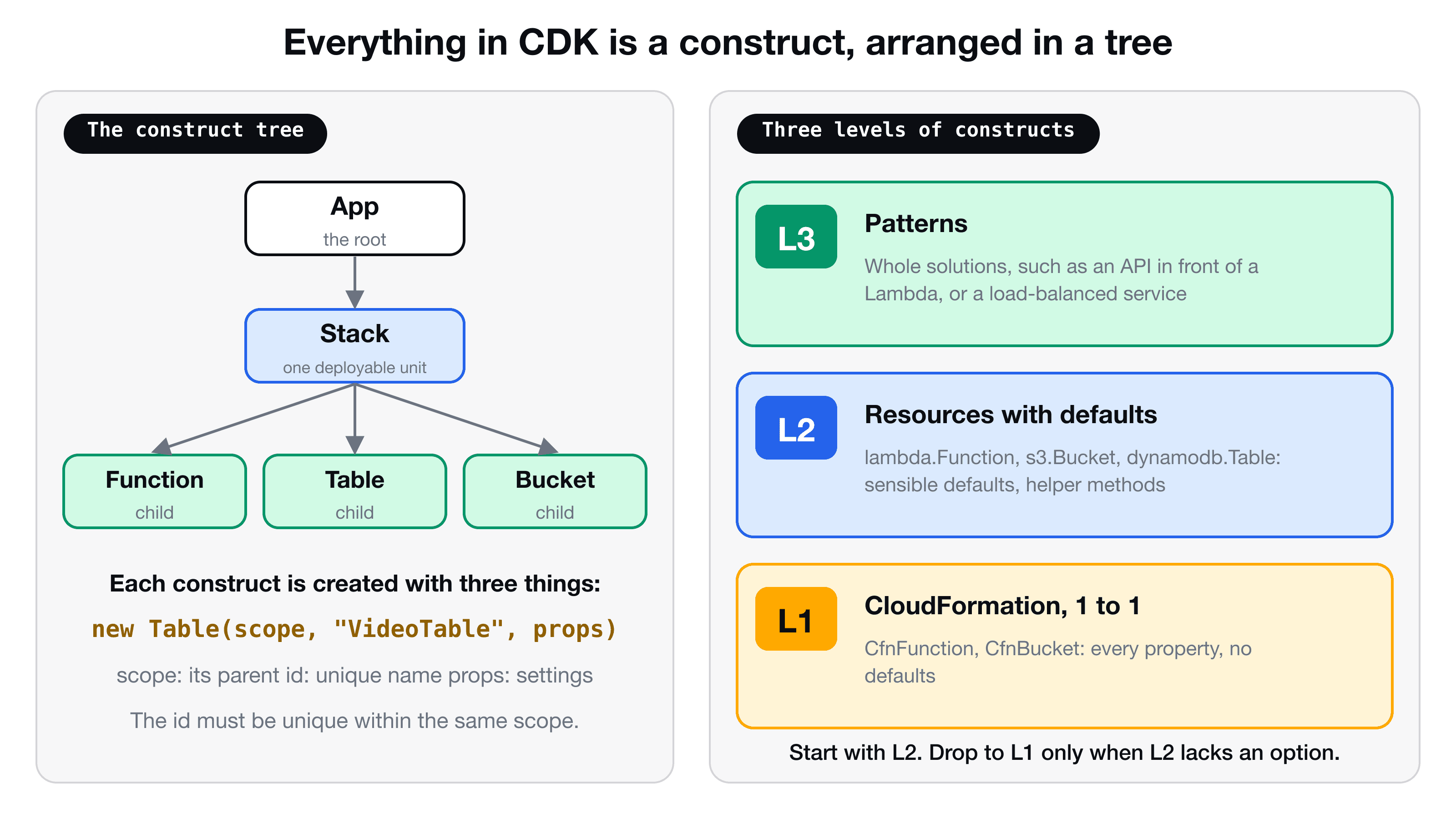
Every construct is created with the same three arguments:
new dynamodb.Table(this, "VideoTable", { partitionKey: { name: "id", type: dynamodb.AttributeType.STRING } });
// ^scope ^id ^props| Argument | Meaning |
|---|---|
scope | The parent construct. Inside a stack you pass this |
id | A name that is unique within that scope. It becomes part of the resource's name in CloudFormation |
props | The settings. Often optional, sometimes required |
If you reuse an id under the same parent, CDK stops with an error such as "There is already a Construct with name 'MyLambda'". The same id under different parents is fine.
L1, L2 and L3
Constructs come in three levels. They differ in how much CDK does for you.
L1: a 1-to-1 mirror of CloudFormation
L1 constructs start with Cfn: lambda.CfnFunction, s3.CfnBucket, dynamodb.CfnTable. Each one maps exactly to a CloudFormation resource and takes the same properties as the CloudFormation documentation. There are no defaults. If CloudFormation says a property is required, you must supply it. For a Lambda function that includes the code and, notably, the role: you have to create an IAM role yourself.
L1 constructs are generated automatically from the CloudFormation specification, so a new AWS feature usually appears here first.
L2: sensible defaults and helper methods
L2 constructs carry the plain names (lambda.Function, s3.Bucket, dynamodb.Table) and wrap an L1 with well-thought-out defaults. A working Lambda needs only three properties:
import * as lambda from "aws-cdk-lib/aws-lambda";

const fn = new lambda.Function(this, "MyLambda", {
  runtime: lambda.Runtime.NODEJS_20_X,
  handler: "index.handler",
  code: lambda.Code.fromInline("exports.handler = async () => ({ statusCode: 200 })"),
});
CDK creates the IAM role for you with logging permissions, so you do not have to think about it. L2 constructs also bring helper methods that make the right thing short:
table.grantReadWriteData(fn);   // adds exactly the IAM permissions needed
bucket.grantRead(fn);
That single line replaces a hand-written policy, and it is the reason most CDK code is L2.
L3: whole patterns
L3 constructs, called patterns, combine several resources into a solution. For example, ecs_patterns.ApplicationLoadBalancedFargateService creates a container service, a load balancer and the networking in a handful of lines. You can also write your own L3 construct for your team, such as "a Lambda with an alarm and a log group", and reuse it.
Which one should you use?
| Level | Prefix | Use when |
|---|---|---|
| L3 | none, often named ...Pattern | A pattern already matches what you want to build |
| L2 | none | Default choice for almost everything |
| L1 | Cfn | An option is missing in the L2, or you want complete control |
You can mix them. Every L2 exposes its L1 underneath through fn.node.defaultChild, so you can set a CloudFormation property that the L2 does not offer, which is called an escape hatch.
Where to look things up
To find the properties of a construct, use the CDK API reference (search for the class name, for example aws_lambda.Function). For L1 constructs, the properties are the same as in the CloudFormation resource documentation for that service, because they map one to one.
What happens when you deploy
cdk synth     # turn the construct tree into a CloudFormation template
cdk diff      # show what would change
cdk deploy    # create or update the stack in your account
cdk synth is where the tree becomes a CloudFormation template. If you are curious what an L2 really does for you, look at the template in cdk.out, and you will see the role and policies that CDK generated.
Key takeaways
- ✓Everything in CDK is a construct: App, Stack, and every resource. They form a tree.
- ✓Every construct is created with scope (the parent), id (unique within the parent) and props.
- ✓L1 constructs (Cfn...) mirror CloudFormation with no defaults. L2 adds defaults and helpers like grantRead. L3 patterns combine many resources.
- ✓Use L2 by default, drop to L1 through node.defaultChild when an option is missing.
- ✓cdk init creates bin/ (entry point), lib/ (your stack) and cdk.json (how to run the app).
Build real infrastructure with it
VidShare: Build a Video Streaming Platform on AWS moves from the AWS console to CDK in the middle of the course and then defines the whole backend as constructs: Lambdas, DynamoDB table and index, S3 buckets, API Gateway, MediaConvert roles and an OpenSearch domain. 109 lessons, lifetime access, and three lessons are free to watch.