
Your Lambda calls DynamoDB and it just works. You never wrote a password, a key or a token. Meanwhile, from your laptop, calling the same kind of AWS endpoint with Postman gives 403 Forbidden until you fill in an access key and a secret.
Same AWS, same kind of request. So where do the credentials in Lambda come from? Understanding this once removes most of the mystery from IAM errors.
Every AWS request is signed
AWS does not accept a username and password per request. Each API request is signed: the caller combines the request details with a secret access key, computes a signature, and sends it along with the access key ID. This scheme is called Signature Version 4 (SigV4).
The important properties:
- The secret key itself is never sent. Only the signature, which proves the sender has the key.
- The signature covers the request (method, path, headers, body, time), so it cannot be reused for a different request.
- AWS knows which identity owns the key, looks up the policies attached to it, and decides whether this action on this resource is allowed.
You almost never compute signatures by hand. The AWS SDK does it for every call, and tools such as Postman have a built-in "AWS Signature" option.
Hands-on: call an IAM-protected Lambda from Postman
Try this once and the concepts become concrete. We will invoke a Lambda function URL that only IAM identities may call.
1. Create a function URL. In the Lambda console, create a function (the default hello-world code is fine), open Configuration → Function URL → Create, and set the auth type to AWS_IAM. (If you choose NONE, anyone on the internet can call it.)
2. Call it unsigned. Paste the URL into Postman and send a GET:
403 Forbidden
AWS refuses because nobody said who is calling.
3. Create an identity. In the IAM console, create a user (for example test-lambda-invoke-user) with no console access: it is for programs only. Then create an access key for it and choose "application running outside AWS". AWS shows the secret access key once. Copy both values now, because if you close the page you must create a new key.
4. Sign the request in Postman. On the request's Authorization tab, choose AWS Signature and enter the access key, the secret key, the region of your function, and the service name, which is lambda for function URLs. Leave the session token empty: it is only for temporary credentials.
5. Send again. You still get 403. The request is now signed, and AWS knows who you are, but the user has no permission yet. Authentication and authorization are two separate steps.
6. Grant the permission. Add an inline policy to the user that allows the action lambda:InvokeFunctionUrl, restricted to your function's ARN.
7. Send again. Now the function answers with its normal response. The signature proved the identity, and the policy allowed the action.
That is the whole model: identity (keys) + policy (permission) = access.
Long-lived keys are the problem
Keys created for an IAM user do not expire. They are fine for a quick test, and a liability anywhere else: one leaked key stays valid until someone notices and deletes it.
For code that runs inside AWS, there is a much better way.
Inside Lambda: no keys to manage
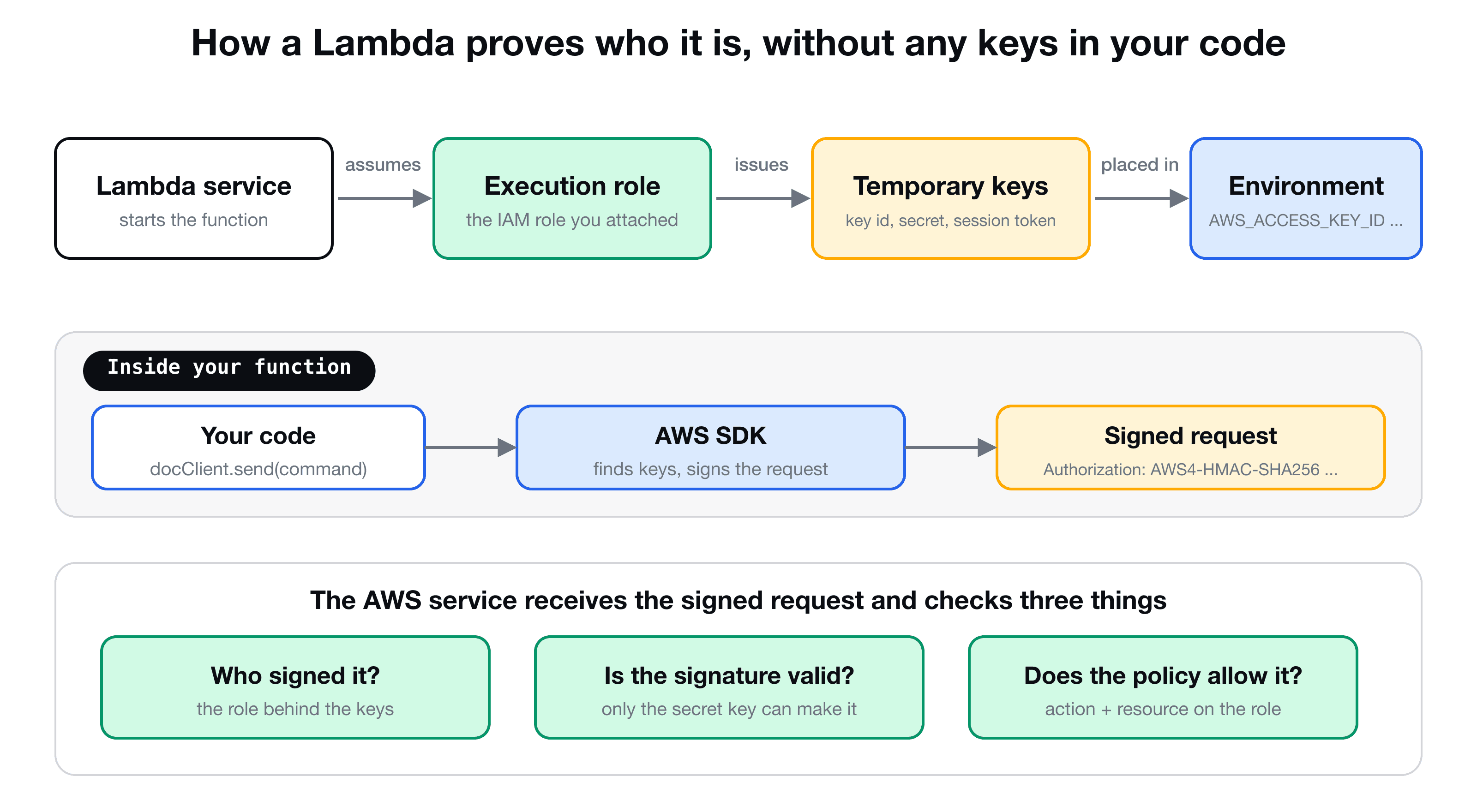
Every Lambda function has an execution role. When the function starts, Lambda assumes that role and receives temporary credentials: an access key ID, a secret key and a session token. It makes them available to your code through the standard environment variables AWS_ACCESS_KEY_ID, AWS_SECRET_ACCESS_KEY and AWS_SESSION_TOKEN. They expire and are refreshed automatically.
The AWS SDK knows where to look. When your code does docClient.send(...), the SDK finds those credentials in the environment, signs the request, and sends it. You wrote no credential code at all.
So when you add a policy to the role (in CDK, table.grantWriteData(fn)), you are deciding what the function's temporary identity may do. This is exactly the three-part setup from Connect Lambda to DynamoDB: code, configuration and permission.
| IAM user access key | Lambda execution role | |
|---|---|---|
| Lifetime | Until you delete it | Hours, refreshed automatically |
| Where it lives | You copy and store it | Provided by the runtime |
| Risk if leaked | Valid for a long time | Expires soon |
| Typical use | Local tools, outside AWS | Anything running in AWS |
Services that are not the AWS SDK: sign it yourself
Some services have their own client libraries that talk plain HTTP, so you must tell them how to sign. OpenSearch is the example from the VidShare project: the @opensearch-project/opensearch client can use a SigV4 signer that reads the same credentials the SDK would:
import { Client } from "@opensearch-project/opensearch";
import { AwsSigv4Signer } from "@opensearch-project/opensearch/aws";
import { defaultProvider } from "@aws-sdk/credential-provider-node";

export const createOpenSearchClient = (endpoint: string, region: string) =>
  new Client({
    ...AwsSigv4Signer({
      region,
      service: "es", // OpenSearch Service domains still use "es"
      getCredentials: () => defaultProvider()(),
    }),
    node: endpoint,
  });
defaultProvider() is the SDK's credential chain: environment variables first (which is what you have in Lambda), then shared config files and profiles on your laptop. The same code works in the cloud and locally. The service name matters, since it is part of what is signed: lambda for function URLs, es for OpenSearch, s3 for S3, and so on. (Check the signer's documentation for your library version, as the import paths have changed over time.)
A checklist for 403 and AccessDenied errors
- Is the request signed? An unsigned call is rejected immediately.
- Who is it signed as? Print the identity with
aws sts get-caller-identitylocally, or read the role name in the error message in Lambda. - Does a policy allow this exact action on this exact resource? The error message names both.
- Is the service name and region in the signature correct? A wrong service name gives a signature error.
- Is a resource policy on the target denying you? Some services, such as S3 and OpenSearch, also have policies on the resource itself, which is the topic of securing an OpenSearch domain.
Key takeaways
- ✓AWS requests are signed (Signature V4) with a secret key that is never sent over the wire.
- ✓Authentication (who are you?) and authorization (what may you do?) are separate: signing alone is not enough, you also need a policy.
- ✓IAM user access keys are long-lived: keep them out of code and delete test keys.
- ✓A Lambda receives temporary credentials for its execution role, which the SDK picks up automatically.
- ✓For non-SDK clients, pass a signer with the right region and service name, using the default credential chain.
Build a backend where this all clicks
VidShare: Build a Video Streaming Platform on AWS uses roles, policies and signed requests in every layer: API Gateway, Lambda, DynamoDB, S3, MediaConvert and OpenSearch, all deployed with CDK. 109 lessons, lifetime access, and three lessons are free to watch.