
An OpenSearch domain on AWS has a public endpoint by default, and it holds your data. The first search tutorial usually ends with "and now it works", and the security discussion comes later, if ever. That is how data gets exposed.
This post explains the security options in the order a request meets them, and shows the simple setup used in the VidShare project: no passwords, one clear rule at the domain, and every call signed by an AWS identity.
(New to OpenSearch itself? Start with Full-text search on AWS with OpenSearch, Lambda and CDK.)
Cluster vs domain
OpenSearch is the search software. It runs as a cluster of nodes, and the cluster has nothing to do with AWS by itself.
When AWS runs a cluster for you, it wraps it and calls the result a domain. The wrapper adds its own protection on top of the cluster's own security. So there are layers, and a request has to pass each one.
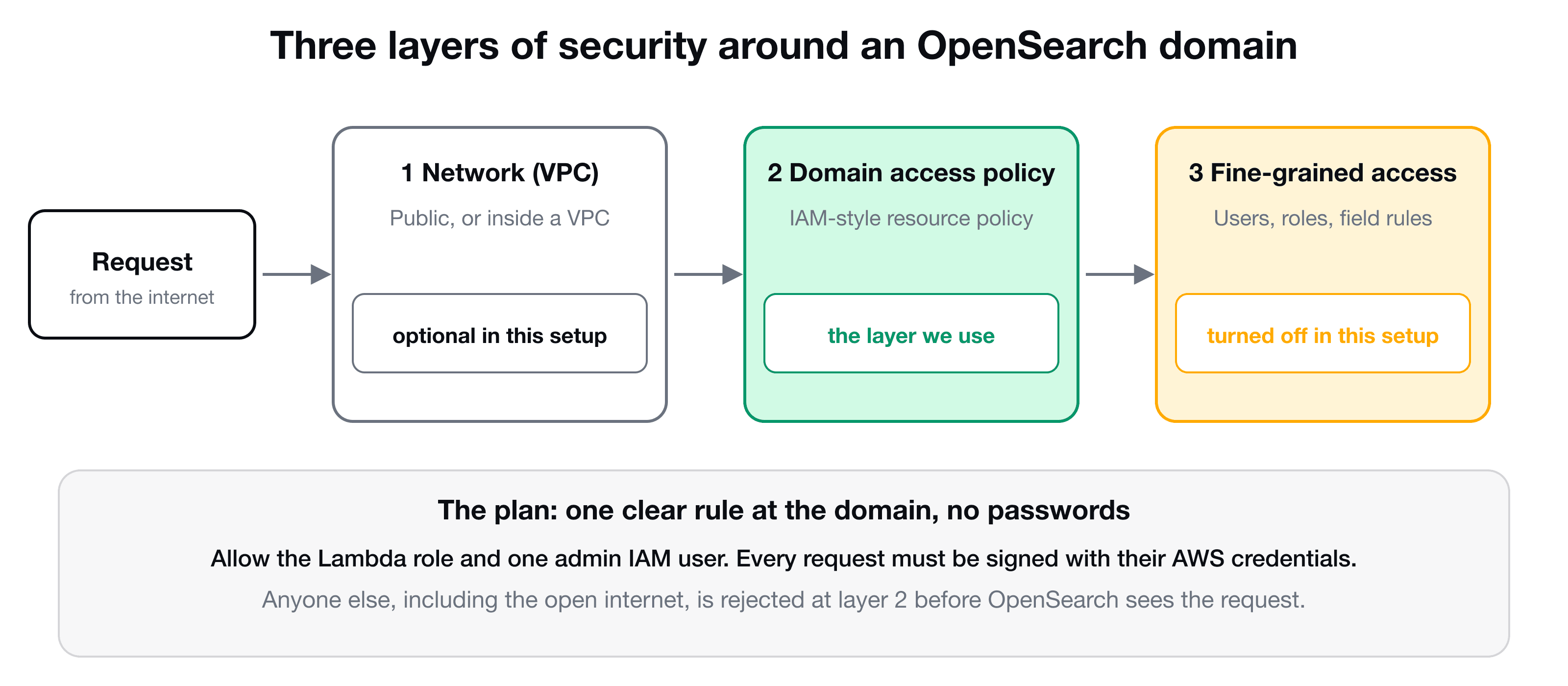
Layer 1: network (VPC)
You can put the domain inside a VPC. Then nothing outside that private network can reach it at all: no public internet access. It is the strongest layer, and the setup needs more work (your Lambdas must run in the VPC too). The rest of this post uses a public endpoint, protected by layers 2 and 3.
Layer 2: the domain access policy
A domain access policy is a resource-based policy attached to the domain, written like the IAM policies you already know. It says which principals (IAM users, roles, accounts) may perform which actions on the domain. Any request that does not match is rejected here, before OpenSearch software sees it.
If this policy is completely open, anyone can pass this layer.
Layer 3: fine-grained access control (FGAC)
Fine-grained access control lives in the cluster. It adds a master user and roles and lets you decide, for example, that a user may read an index but only see three of the five fields in each document. That is where the "fine-grained" name comes from.
If you create a domain in the console with FGAC enabled and "only use fine-grained access control", then the domain policy stays open and the master user name and password protect everything. That works, but you now manage a password, and a domain policy that is open to the world is a bad default.
The simple, secure plan
For an application where one backend talks to the search cluster, FGAC is more than you need. So:
- Turn FGAC off.
- Keep the endpoint public, but add a domain access policy naming exactly who may call it: the Lambda functions' roles, and one admin IAM user for your own tests.
- Every request must then be signed with AWS credentials (how signing works). An anonymous request is rejected at layer 2.
No password exists anywhere, so none can leak.
Two ways to allow a caller
IAM lets you grant access in two places, and either is enough within one account:
| Identity-based (on the caller) | Resource-based (on the domain) | |
|---|---|---|
| Where | The role or user policy | The domain access policy |
| CDK | domain.grantReadWrite(lambda) | domain.addAccessPolicies(statement) |
| Good for | Your Lambdas, which are defined in the same stack | A user or account that is not part of your stack, such as your admin user |
The VidShare Lambdas use grantReadWrite, which attaches permissions to their roles. For your own admin user, add the policy on the domain:
import * as iam from "aws-cdk-lib/aws-iam";

domain.addAccessPolicies(
  new iam.PolicyStatement({
    effect: iam.Effect.ALLOW,
    principals: [new iam.ArnPrincipal("arn:aws:iam::123456789012:user/opensearch-admin")],
    actions: ["es:*"],
    resources: [domain.domainArn, `${domain.domainArn}/*`],
  }),
);
Reading the statement:
- principals: the IAM user that may call the domain. Use the user's ARN.
- actions:
es:*allows everything. You can narrow it, for example toes:ESHttpGet, for a read-only user. - resources: the domain itself and everything under it. Limiting the resource path is how you would allow one user to call only some endpoints.
Deploy, and the policy appears under the domain's Security configuration in the console.
Prove it from Postman
1. Call the domain unsigned. Copy the domain endpoint and send a GET with no authorization. You get a 403, with a message like:
{"Message":"User: anonymous is not authorized to perform: es:ESHttpGet because no resource-based policy allows the es:ESHttpGet action"}That is the policy working: an anonymous caller is not in it.
2. Create credentials for the admin user. In IAM, create an access key for opensearch-admin ("application running outside AWS"), and copy the secret, which is shown only once.
3. Store the keys in a Postman environment. Create an environment with variables for the endpoint, access key, secret key and region, so you do not paste secrets into every request. Put the requests into a collection, and set the authorization once on the collection: choose AWS Signature, reference the variables, and set the service name to es. Each request in the collection inherits it ("inherit auth from parent").
4. Send a request. A GET on the endpoint's root (or /_cluster/health) now returns the cluster details, with your signed identity let through the domain policy.
You are using the same signing that your Lambdas use, just with an IAM user instead of a role. When you do not need the user any more, delete the access key.
When you do need fine-grained access control
Use FGAC when several people or services need different rights on the same cluster: analysts who may read some indices, an app that may write others, or per-field restrictions on sensitive data. It also gives you an OpenSearch Dashboards login. Enabling it needs encryption options (node-to-node encryption, encryption at rest and HTTPS enforcement) and a master user, and in CDK you set it through the domain's fine-grained access control properties. With one backend and a few IAM identities, the domain access policy is simpler and has less to go wrong.
Key takeaways
- ✓An OpenSearch domain wraps the cluster. A request passes the network layer, the domain access policy, then fine-grained access control.
- ✓Never leave the domain policy open. Name the exact principals that may call it.
- ✓With one backend, turn FGAC off and rely on the domain policy plus signed requests, so there is no password.
- ✓Grant Lambdas with domain.grantReadWrite, and other identities with domain.addAccessPolicies.
- ✓Test from Postman with AWS Signature, service name es, keys kept in an environment. Delete test keys afterwards.
Build the whole search stack
VidShare: Build a Video Streaming Platform on AWS finishes with full-text search: the OpenSearch domain, its index created at deploy time, the signed client, and the Lambdas that index and search videos, all secured and deployed with CDK. 109 lessons, lifetime access, and three lessons are free to watch.