
API Gateway is the front door of most serverless apps on AWS. The console has dozens of screens and options, and the vocabulary (resources, methods, stages, integrations, mapping, proxy) sounds like it came from three different products.
It is simpler than it looks. This guide explains the idea first, then each term, then builds a small API with a Lambda behind it.
The problem an API gateway solves
Imagine an online bookstore. The client app calls /books on one server and /orders on another. Traffic grows, you move /books to a new server, and now every client must be updated with the new address. Your front end and your back end are tightly coupled.
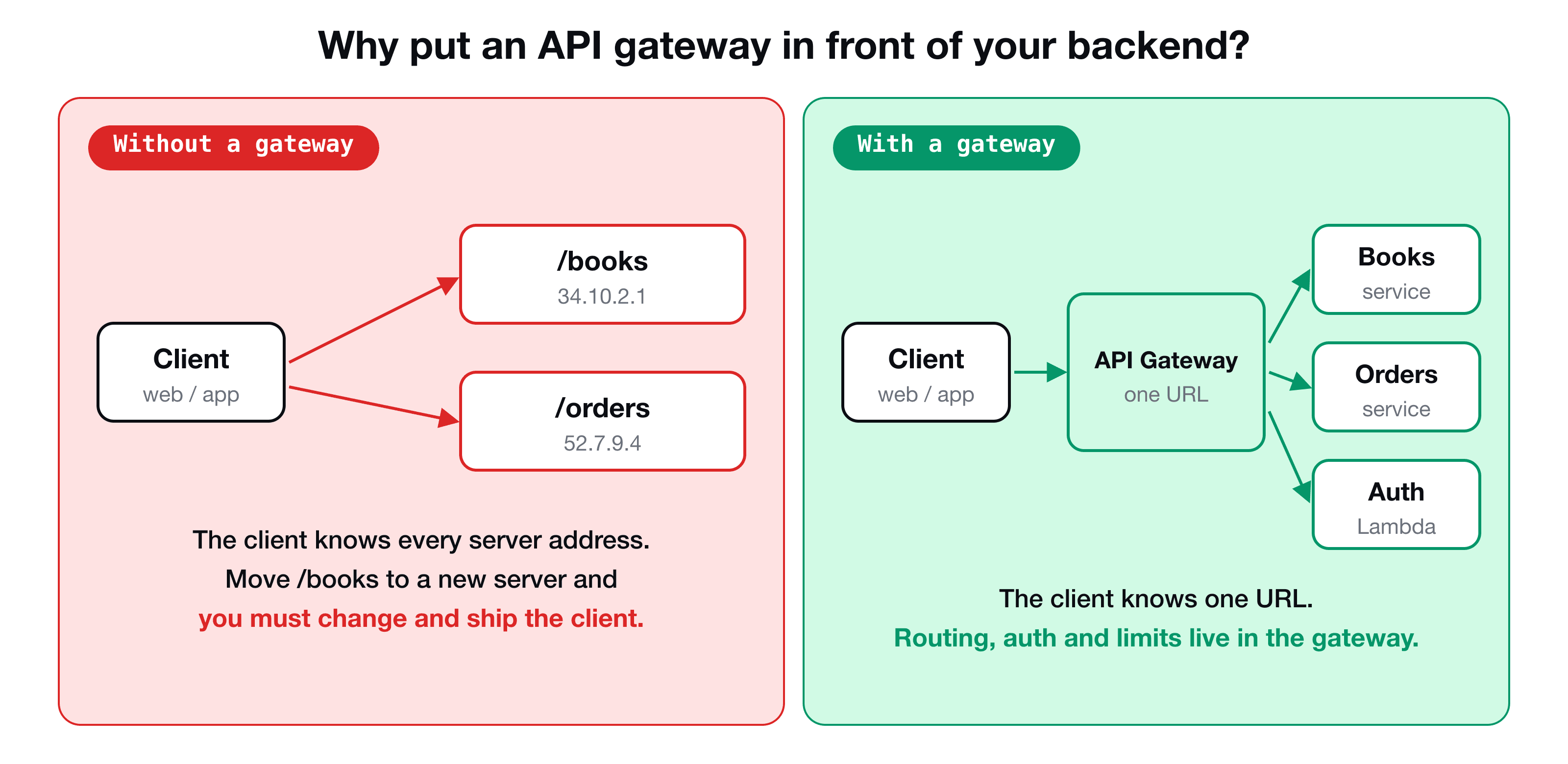
An API gateway sits between them. Clients only know the gateway's URL. The gateway keeps a routing table: a request for /books goes to the book service, /orders goes to the order service. The services behind it are called upstream services. You can move, split or replace them, and clients never notice. It is also the natural place for authentication, throttling and logging, so each service does not have to repeat them.
You could run a gateway yourself on a server. Amazon API Gateway is the managed, serverless version: you declare the routes and where each one should go, and AWS runs it for you.
REST API, HTTP API or WebSocket API?
When you create an API in the console you must choose a type:
| Type | Use it for |
|---|---|
| REST API | The full-featured option: request and response mapping, API keys, usage plans, per-method caching, private endpoints |
| HTTP API | A simpler, cheaper, faster take on the same job, with fewer features |
| WebSocket API | Real-time two-way communication, such as chat |
The VidShare project uses a REST API, and the rest of this post does too. If you do not need the extra features, an HTTP API is often enough.
For a REST API you also pick an endpoint type:
- Regional: the API lives in the region you chose. A good default.
- Edge-optimized: requests enter through the CloudFront edge network, which helps clients spread across the world.
- Private: reachable only from inside your VPC.
The building blocks
Resources
A resource is a path of your API: /video, /users, /products. Resources can be nested, so /users/manager is a child of /users. Every API starts with the root /.
Methods
A method is an HTTP verb attached to a resource: GET /video, PUT /video, DELETE /products. A resource only responds to the methods you add to it.
Integrations
For every method you decide what happens when it is called. That is the integration, and the options are:
- a Lambda function (the most common),
- an HTTP endpoint (your own server or a third-party API),
- another AWS service, called directly,
- a VPC link (to something private),
- a mock: API Gateway answers with a response you hard-coded. It is handy while you are developing, because no backend exists yet.
Stages
Creating resources and methods does not make your API reachable. You must deploy it to a stage, which is a named snapshot such as dev or prod. Each stage gets its own URL, so you can keep several environments side by side.
https://<api-id>.execute-api.<region>.amazonaws.com/<stage>/<resource>
Authorizers
An authorizer runs before your integration, and decides whether the caller is allowed in. A Lambda authorizer is your own function that inspects the token or header and answers yes or no. This is the "handle authentication in one place" benefit of a gateway.
What happens to a request
REST APIs split a call into four steps, which is where the confusing console tabs come from:
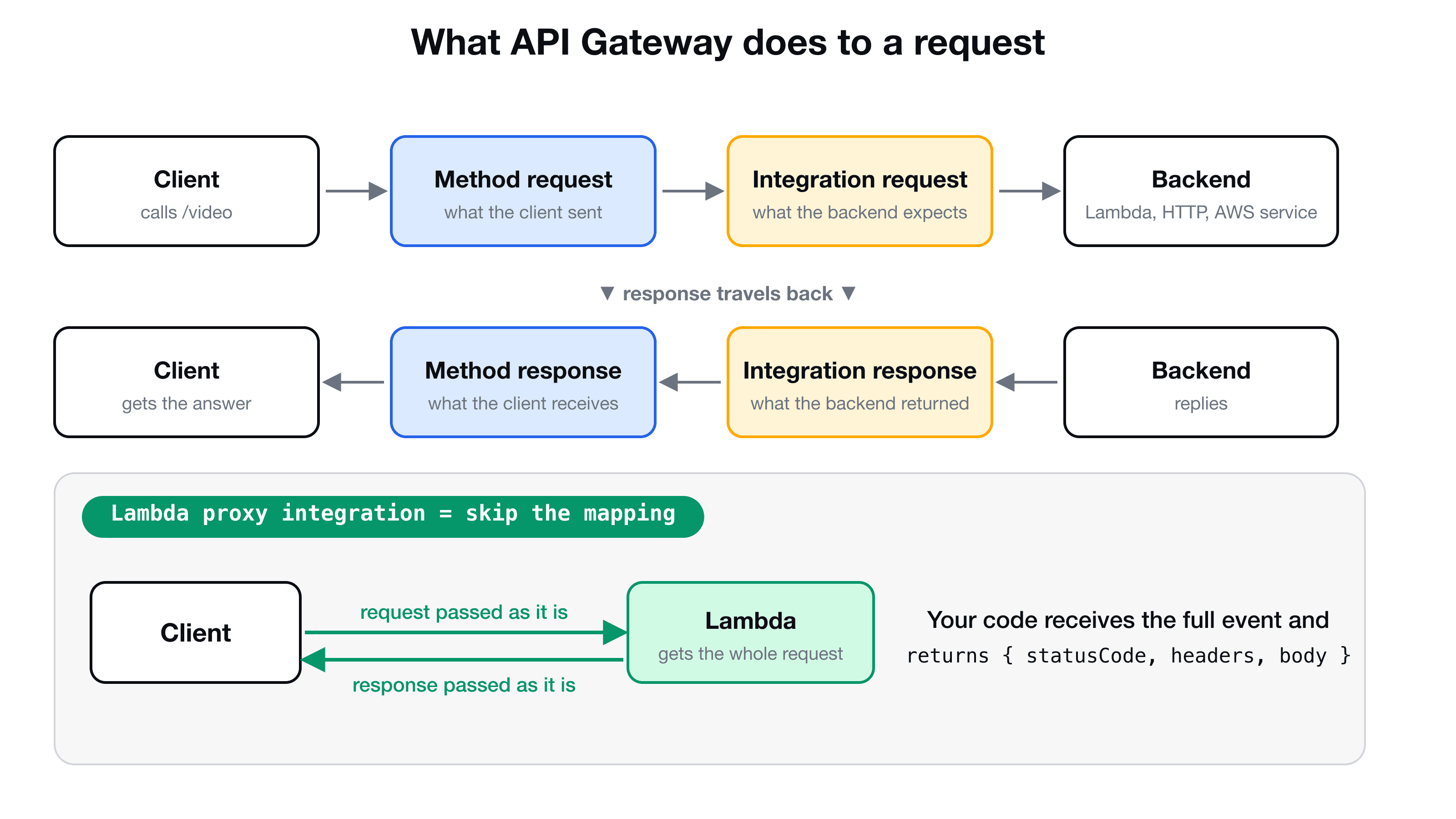
- Method request: what the client sent (query string, headers, body).
- Integration request: what the backend expects. It can be different.
- Integration response: what the backend answered.
- Method response: what the client finally receives.
Say a client sends GET /tickets?date=2026-12-01&maxPrice=5000, but the airline backend wants a POST with a JSON body containing boardingDate and max. You use mapping to translate between them: date becomes boardingDate, maxPrice becomes max. The reverse happens on the way back: the backend returns a long list with ids and flight numbers, and you reshape it into a short price list for the client.
Lambda proxy integration: skip the mapping
Mapping is powerful and also fiddly. When your backend is your own Lambda, there is a shortcut: tick Use Lambda Proxy integration. API Gateway then passes the whole request to your function as an event object, and sends back whatever your function returns. No mapping at all.
The cost is one rule, which you must follow: your function has to return an object in this shape.
export const handler = async (event: any) => {
  return {
    statusCode: 200,
    headers: { "Content-Type": "application/json" },
    body: JSON.stringify({ message: "hello from lambda" }),
  };
};
If you return a bare string or leave out statusCode, the client gets 502 Bad Gateway with "Malformed Lambda proxy response". It is the most common first error, and it always means the return shape is wrong.
There is an HTTP version too: HTTP proxy integration forwards the request to an HTTP endpoint as it is.
Proxy resources: catch every path
What if you do not know the path in advance, for example /users/123/orders/456? A path variable in curly braces, like /users/{userId}, captures one segment. A greedy proxy resource, written {proxy+}, captures everything below a path and passes it on. Combined with Lambda proxy integration and the ANY method, one Lambda can serve a whole API. One Lambda or many? walks through that design.
Build your first API
A short tour, using the same steps as the VidShare project (the console moves things around from time to time, so the labels may differ slightly).
- Create the Lambda. In the Lambda console choose Create function, Author from scratch, pick a Node.js runtime, and name it
video-put-handler. - Create the API. In API Gateway choose REST API, then Build, New API, give it a name, and leave the endpoint type as Regional.
- Add a resource. Create resource, name it
video, so the path is/video. - Add a method. Select
/video, Create method, choosePUT, integration type Lambda function, tick Use Lambda proxy integration, and select your function. API Gateway adds the permission that allows it to invoke your Lambda. Accept the prompt. - Deploy. Deploy API, create a new stage called
dev, and deploy. The console shows the Invoke URL. - Call it.
See what Lambda really receives
Change the handler to return the event itself (body: JSON.stringify(event)), redeploy the Lambda, and call the API with a JSON body:
The returned event contains the request, trimmed here:
{
  "resource": "/video",
  "httpMethod": "PUT",
  "headers": { "Content-Type": "application/json" },
  "requestContext": { "stage": "dev", "resourcePath": "/video" },
  "body": "{\"title\": \"My new video\"}"
}
The route, the verb, the headers and the body are all there, and body arrives as a string you must parse yourself. That is the whole contract between API Gateway and your function. Nothing else in the console is needed to understand a Lambda-backed API.
Where this API goes next
In a real project you would not click all of this by hand for every environment. You define the API, the Lambda and the permissions in code, so they can be redeployed and reviewed. AWS CDK in TypeScript does exactly that, and the VidShare course moves from the console to CDK for this reason.
Key takeaways
- ✓An API gateway gives clients one stable URL and keeps routing, auth and throttling out of every service.
- ✓A REST API is made of resources (paths), methods (verbs), integrations (what runs) and stages (deployed environments).
- ✓Nothing is reachable until you deploy to a stage. Redeploy after each change.
- ✓Method request and response face the client, integration request and response face the backend, and mapping translates between them.
- ✓Lambda proxy integration passes the full event to your function. Return statusCode, headers and a string body, or you get a 502.
Build the whole thing, end to end
VidShare: Build a Video Streaming Platform on AWS is 109 lessons that take you from this API Gateway to a complete system: Lambda, DynamoDB, S3, MediaConvert, OpenSearch and CDK, with tests along the way. Lifetime access, and three lessons are free to watch.