
The first line of almost every shell script is a strange one: #!/bin/bash. It starts with #, which normally means "comment", but it is not ignored. That line is called the shebang, and it decides which program runs your script.
What the shebang is
A shebang is the two characters #! ("hash" and "bang", so sha-bang) followed by the path of an interpreter. It must be the very first line of the file, with nothing before it, not even a blank line.
#!/bin/bash
echo "Hello from $0"
An interpreter is a program that reads a script and runs it. The shell you type commands into is one: it takes the text you write and turns it into actions. There is more than one shell (Bash, Zsh, Dash, and old ones like the C shell), and they are not identical. The shebang says which one this script was written for.
What happens when you run a script
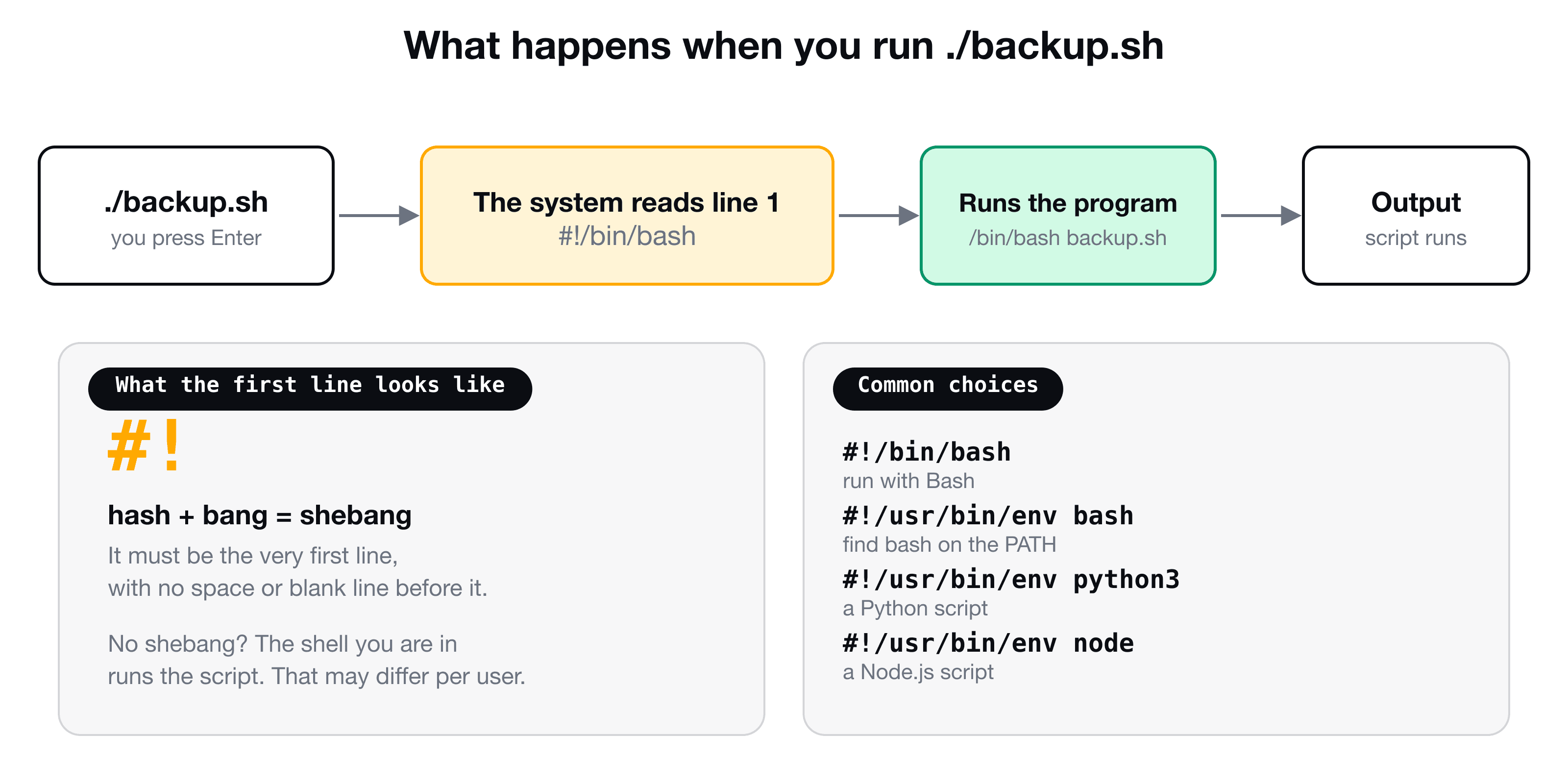
When you run ./backup.sh, the operating system opens the file and looks at the first two bytes. If they are #!, it reads the rest of the line, starts that program, and hands it your script as an argument. ./backup.sh becomes /bin/bash ./backup.sh automatically.
This is also why the script must be executable first (chmod +x backup.sh), which is covered in Shell scripting for beginners and in file permissions.
What if there is no shebang?
If you leave it out, the script still runs, but the shell you are currently using decides how. You can see which one that is:
($0 holds the name of the current shell when you type it directly into the terminal. Typing bash starts a new Bash inside your current shell, and exit takes you back out.)
Without a shebang, the same script can behave differently for you (Zsh on a Mac), for your colleague (Bash on Ubuntu) and for a cron job (often plain sh). A script that works for you and breaks elsewhere is often exactly this. With a shebang, the choice is made once, in the file.
You can also override the shebang by naming the interpreter yourself: bash backup.sh. Then the first line is only a comment.
/bin/bash vs /usr/bin/env bash
You will see both styles:
#!/bin/bash
#!/usr/bin/env bash
The first is an absolute path: use exactly the program at /bin/bash. That works on most Linux systems, but not everywhere. On macOS, /bin/bash is an old version, and on some systems Bash lives at /usr/local/bin/bash or /opt/homebrew/bin/bash.
The second uses a helper called env, which searches your PATH for the first bash it can find (how the PATH works is in How the shell finds commands). It is more portable, and it picks up a newer Bash that you installed yourself. The trade-off is that it depends on the person's PATH, so some security-minded scripts prefer the fixed path.
To see where an interpreter lives on your machine:
It is not only for shells
Any language with an interpreter can use a shebang, so scripts become real commands:
| First line | Runs the script with |
|---|---|
#!/bin/bash | Bash |
#!/bin/sh | The system's basic POSIX shell (no Bash-only features) |
#!/usr/bin/env python3 | Python 3 |
#!/usr/bin/env node | Node.js |
#!/usr/bin/env ruby | Ruby |
A Python file starting with #!/usr/bin/env python3 and marked executable runs as ./tool.py, with no python3 typed at all. Many command-line tools you install (including those from npm) are exactly that: small scripts with a shebang.
"bad interpreter: No such file or directory"
The most common shebang error looks like this:
-bash: ./script.sh: /bin/bash^M: bad interpreter: No such file or directory
Notice the ^M. The file has Windows line endings (CRLF), so the system reads the interpreter as /bin/bash followed by an invisible carriage return, which does not exist. It happens when a script is edited on Windows or copied from some editors. Convert it to Unix line endings:
sed -i 's/\r$//' script.sh        # on Linux
dos2unix script.sh                # if installed
Another cause is simply a wrong path in the shebang, such as /bin/bsh. Check it with which.
A good default
For scripts that you share or run on several machines:
#!/usr/bin/env bash
set -euo pipefail

echo "Running on $(uname -s)"
set -euo pipefail makes Bash stop on errors and on undefined variables, which saves many silent failures. It is a Bash habit worth learning once you are comfortable with the basics.
Key takeaways
- ✓A shebang (#!) on the first line tells the system which interpreter runs the script.
- ✓Without one, the script runs in whatever shell you happen to be using, which can differ between machines.
- ✓#!/bin/bash uses a fixed path. #!/usr/bin/env bash searches the PATH and is more portable.
- ✓Python, Node and other languages use the same mechanism: #!/usr/bin/env python3.
- ✓'bad interpreter' with ^M means Windows line endings. Convert the file to Unix format.
Write scripts you can trust
A script is a small program, and the shebang is the first decision in it. CLI Mastery takes you from your first command to variables, input, configuration files and a real server over SSH. 57 lessons, lifetime access. Try the free lesson on how the terminal talks to the shell.