
Not every useful tool is an npm package. MediaInfo reads video metadata, ffmpeg converts media, ImageMagick resizes images: they are command-line programs. To use one inside a Lambda, you have to do two things: get the executable into the function's package, and call it from Node.
This post covers both, plus the two mistakes that bite most people: the wrong CPU architecture, and building the command as a string.
(This is the general technique. In context, it is used in Trigger a Lambda on S3 upload and read video metadata with MediaInfo.)
Step 1: call a program from Node
Node's child_process module starts other programs. exec and execFile both take a callback, and util.promisify turns them into functions you can await:
import { execFile } from "node:child_process";
import { promisify } from "node:util";

const execFileAsync = promisify(execFile);

const { stdout, stderr } = await execFileAsync("/bin/ls", ["-la"]);
console.log(stdout);
promisify takes any function whose last argument is a Node-style callback ((error, result) => ...) and returns a version that returns a promise. stdout and stderr are the program's two output streams (explained in stdin, stdout and stderr).
You can test this idea in a Lambda before any binary is involved. A function that runs ls -la and returns the output shows you the Lambda's file system: your code lives in /var/task, and /tmp is the only writable folder.
Use the full path
When you type ls in a terminal, the shell finds the program by searching the folders in PATH. which ls shows the result, such as /bin/ls. In Lambda you may not want to depend on that, so call the program by its absolute path: /bin/ls, or for your own binary, a path inside the package. (How the lookup works is in How the shell finds commands.)
A small ES module gotcha
If your first test file is named index.mjs, you are in an ES module, and require is not defined ("ReferenceError: require is not defined in ES module scope"). Use import syntax, as above. TypeScript compiled by CDK takes care of this for you.
Step 2: execFile, not exec
There are two ways to run a program, and they are not equal:
// Dangerous: the command is built as ONE string and passed to a shell
exec(`mediainfo --output=JSON '${url}'`, callback);

// Safe: the program and its arguments are separate
execFile("mediainfo", ["--output=JSON", url], callback);
With exec, the string goes through a shell. If any part of it comes from outside (a file name, a URL, a query string), a value like x'; rm -rf /tmp/*; ' can end the quote and add a second command. That is command injection. A signed S3 URL also contains & characters, which the shell treats specially, so even honest input breaks unless you quote it perfectly.
execFile starts the program directly and passes each argument as its own item. There is no shell to confuse, so no quoting is needed and nothing is interpreted. Use execFile whenever any argument contains data you did not write.
Step 3: put the executable in the package
A Lambda function runs the files in its deployment package. The tool's binary has to be in that package. With NodejsFunction, CDK bundles your TypeScript with esbuild, which only follows import statements, so it knows nothing about a binary you merely mention in a string.
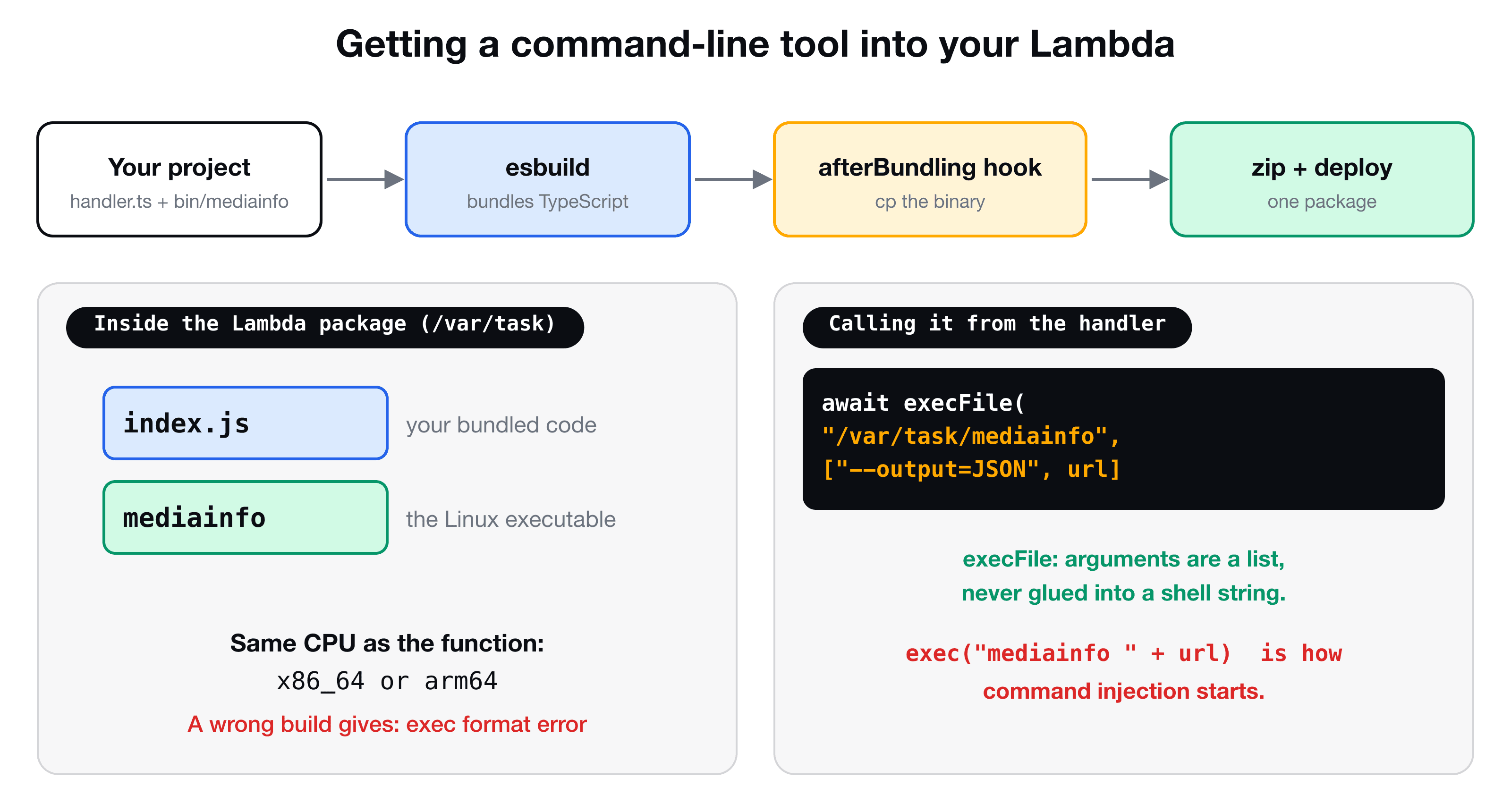
Use a bundling command hook, which runs a shell command at a stage of the build. The afterBundling hook runs once the code is bundled and before it is zipped:
import { NodejsFunction } from "aws-cdk-lib/aws-lambda-nodejs";

const s3EventListener = new NodejsFunction(this, "S3EventListener", {
  entry: "lambdas/s3-event-listener.ts",
  timeout: cdk.Duration.minutes(1),
  environment: { MEDIA_INFO_CLI_PATH: "/var/task/mediainfo" },
  bundling: {
    commandHooks: {
      beforeBundling: () => [],
      beforeInstall: () => [],
      afterBundling: (inputDir: string, outputDir: string) => [
        `cp ${inputDir}/lambda-binary/mediainfo ${outputDir}/mediainfo`,
        `chmod +x ${outputDir}/mediainfo`,
      ],
    },
  },
});- Each hook returns an array of shell commands. TypeScript requires all three hooks in the type, so unused ones return an empty array.
inputDiris your project root,outputDiris the folder CDK is about to zip. Whatever you copy there ends up next to your bundledindex.js.chmod +xmakes sure the file is executable. It usually survives the copy, but being explicit costs nothing and avoids "Permission denied" at runtime.- The path in the environment variable matches where the file lands. Lambda unpacks the package at
/var/task.
Use it in the handler
export class VideoMetadata {
  constructor(private config: { mediaInfoCliPath: string }) {}

  async fromUrl(url: string) {
    const { stdout } = await execFileAsync(this.config.mediaInfoCliPath, ["--output=JSON", url]);
    const payload = JSON.parse(stdout);
    const general = payload.media.track[0];
    const video = payload.media.track[1];
    return {
      fileSize: parseInt(general.FileSize, 10),
      width: parseInt(video.Width, 10),
      height: parseInt(video.Height, 10),
    };
  }
}
Creating the VideoMetadata object outside the handler is a good fit here, because it only stores a path (see what belongs outside the Lambda handler).
The two classic failures
| Error | Cause | Fix |
|---|---|---|
spawn Unknown system error -8 or exec format error | The binary was built for a different CPU, or for macOS | Download the Linux build that matches the function's architecture: x86_64 or arm64 |
EACCES: permission denied | The file is not executable | Add chmod +x in the hook |
ENOENT: no such file or directory | The path is wrong, or the hook did not copy the file | Check outputDir, and list /var/task in a test |
| The invocation times out | The tool is slow, or reads a large file | Raise the Lambda timeout, and for big media raise memorySize too |
The architecture is set on the function (architecture: lambda.Architecture.ARM_64, or the default x86_64). A binary downloaded on your Mac will not run in Lambda: you need the Linux build.
When to use a layer or a container instead
A Lambda layer is a separate zip that can be shared by several functions, which suits a large tool like ffmpeg that many functions use. If the binary plus your code goes beyond Lambda's size limits, a container image is the next step. For a small tool such as MediaInfo, copying it with a bundling hook is the simplest option.
Key takeaways
- ✓child_process runs programs from Node. promisify turns the callback into a promise.
- ✓Prefer execFile with an argument array over exec with a command string, to avoid command injection and quoting bugs.
- ✓esbuild only bundles what you import. Copy a binary into the package with an afterBundling command hook, and chmod +x it.
- ✓Use the Linux build for the function's CPU architecture (x86_64 or arm64).
- ✓For big shared tools, use a layer or a container image instead.
See it inside a complete pipeline
VidShare: Build a Video Streaming Platform on AWS uses this exact technique in a real pipeline: S3 upload event, MediaInfo to read the video, MediaConvert to transcode, EventBridge, DynamoDB and OpenSearch, all deployed with CDK. 109 lessons, lifetime access, and three lessons are free to watch.