
You have seen > /dev/null 2>&1 at the end of commands in cron jobs and install scripts, and probably copied it without knowing what it does. It is built from one idea: every command has three streams, and the shell lets you point each of them anywhere you like.
Once you see the three streams, redirection, pipes and /dev/null are all the same trick.
The three streams
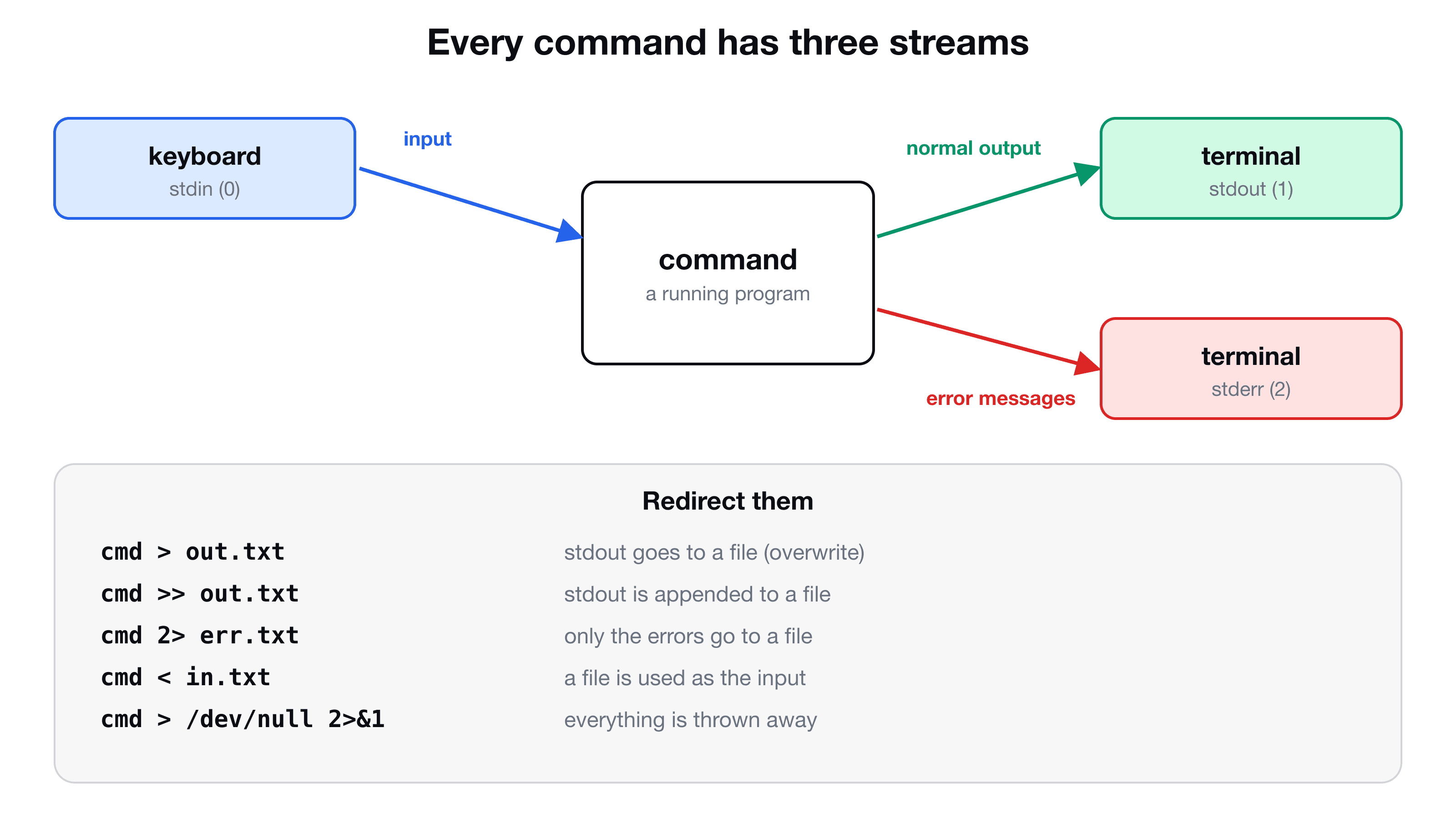
| Stream | Number | Default | Carries |
|---|---|---|---|
| stdin | 0 | Your keyboard | Input to the command |
| stdout | 1 | The terminal window | Normal output |
| stderr | 2 | The terminal window | Error messages |
The names go back to the days when the input device was a typewriter and the output was a printer. The numbers (file descriptors) are what you use when you redirect.
You can see stdin in action by running cat with no file. It waits for you to type, and echoes each line back. Ctrl + C stops it:
Redirect stdout: > and >>
The > sends normal output into a file instead of the screen. A single > replaces the file, and >> appends:
Redirect stdin: <
The < feeds a file to the command as its input:
cat < file1.txt     # the file content arrives on stdin
cat file1.txt       # the file name is an argument (same result, different mechanism)
Some commands read stdin and some do not. echo only uses its arguments, so echo < file1.txt prints an empty line.
The part people miss: stderr is separate
Run a command that fails, and send its output to a file:
The error still appeared on the screen, and result.txt is empty. The > only redirects stream 1 (stdout). The error message travels on stream 2 (stderr), which is untouched. That separation is deliberate: it lets you save the results while still seeing the problems, or the other way around.
To redirect stderr, put its number in front of the >:
Send both to the same place: 2>&1
2>&1 reads as "send stream 2 to wherever stream 1 is going". It lets you collect everything in one file:
./backup.sh > backup.log 2>&1 # output and errors, both in backup.logTwo things to know:
- Order matters.
> backup.log 2>&1redirects stdout to the file first, then points stderr at it. Written the other way (2>&1 > backup.log), stderr is pointed at the terminal before stdout moves, and the errors still show on screen. - In Bash and Zsh there is a shortcut:
&> backup.logmeans the same as> backup.log 2>&1.
What is /dev/null?
/dev/null is a special file that discards everything written to it, and gives an empty result when read. It is the null device, often called the black hole: whatever you send there is gone, and you cannot get it back.
It works because in Unix everything is a file, so a destination for data does not have to be a real file on a disk. You can write to a printer, a terminal, or a black hole with the same >.
Why you would throw output away
You run a command for its effect, and do not want its chatter, neither on screen nor in a file. A common case is a script that runs from cron, where output would otherwise be emailed or fill a log:
./cleanup.sh > /dev/null           # drop the output, keep seeing errors
./cleanup.sh > /dev/null 2>&1      # drop the output AND the errors (total silence)
./find-things.sh 2> /dev/null      # keep the output, hide only the error noise
The last one is useful with find, which prints a "Permission denied" line for every folder it cannot enter:
find / -name "*.conf" 2> /dev/nullPipes use the same idea
A pipe | connects stdout of one command to stdin of the next. Stderr is not piped: it still goes to the screen, which is usually what you want. That is the next step from here, covered in Linux pipes and redirection explained.
Cheat sheet
| Syntax | Meaning |
|---|---|
cmd > file | stdout to file (overwrite) |
cmd >> file | stdout to file (append) |
cmd < file | file as stdin |
cmd 2> file | stderr to file |
cmd > file 2>&1 | stdout and stderr to the same file |
cmd &> file | same, in Bash and Zsh |
cmd > /dev/null | discard output, show errors |
cmd > /dev/null 2>&1 | discard everything |
cmd 2> /dev/null | hide errors only |
Key takeaways
- ✓Every command has stdin (0), stdout (1) and stderr (2).
- ✓> and >> redirect stdout. 2> redirects stderr. < supplies stdin.
- ✓A plain > leaves errors on the screen. Use 2>&1 to send both streams to the same place.
- ✓/dev/null discards everything written to it. > /dev/null 2>&1 silences a command completely.
- ✓Redirect to a log file first when you debug a job that fails silently.
Understand the shell, not just copy it
This is where the command line starts to feel like a language. CLI Mastery builds it up from the terminal and shell, through files, permissions and processes, to pipes, scripts and a real server. 57 lessons, lifetime access. Start with the free pipes lesson.