
Typing a file name is fine when you have three files. When you have three hundred, you need a way to say "every file that looks like this". That is what wildcards (also called glob patterns) are for.
Once you know four symbols, ls *.txt, rm photo-0?.jpg and cp *.log backup/ become second nature.
The three symbols you will use daily
| Symbol | Matches | Example |
|---|---|---|
* | Zero or more characters | *.txt matches cat.txt, big-file.txt |
? | Exactly one character | file-?.txt matches file-1.txt, not file-10.txt |
[ ] | One character from a set or range | file-[1-2].txt matches file-1.txt and file-2.txt |
Let's try them on a folder with six files:
Here is the same experiment as a grid, so you can see which pattern catches which file:
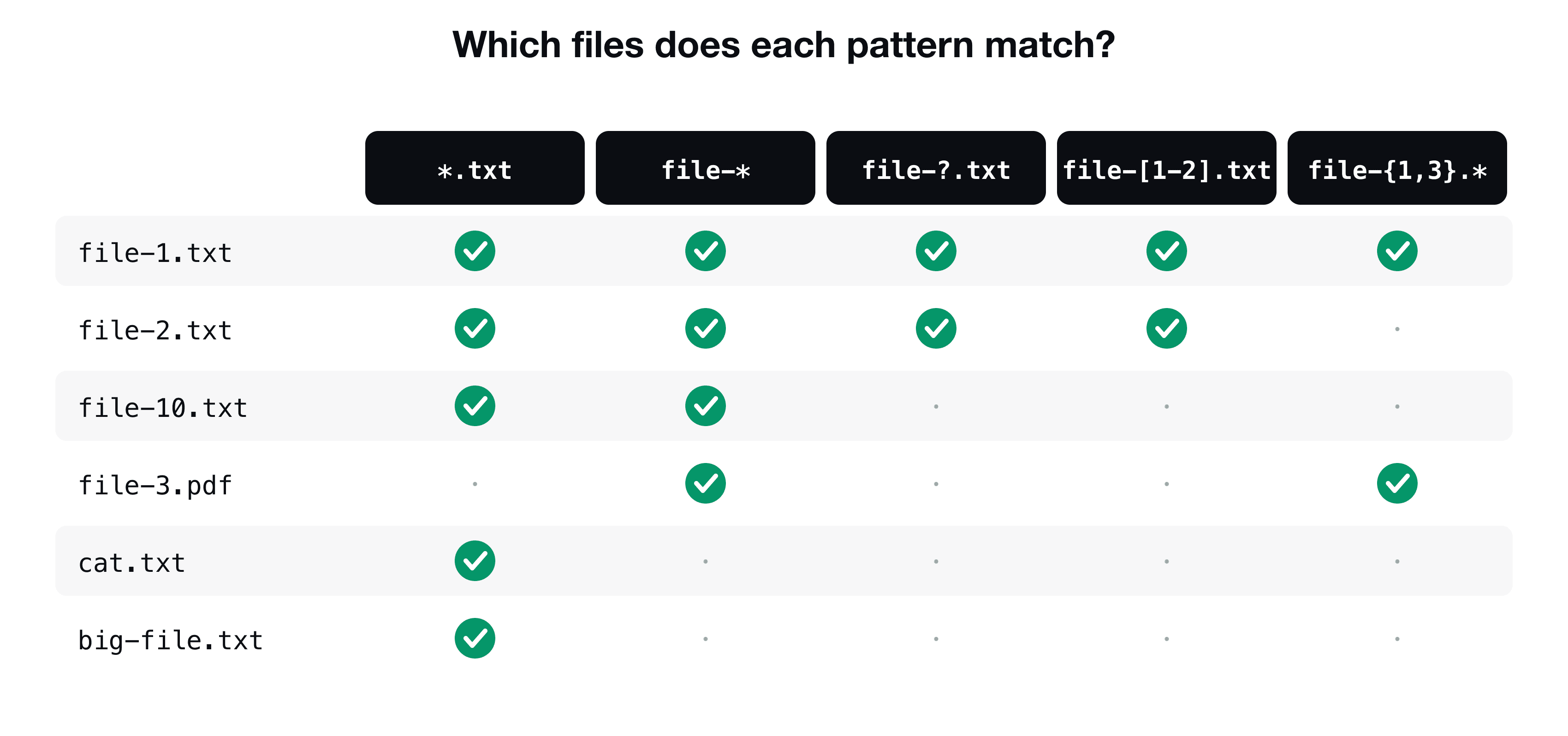
Notice why big-file.txt is not matched by file-*: a pattern has to match the whole name, and that name starts with big-.
? counts characters
file-?.txt skips file-10.txt, because after file- there are two characters (10) and ? stands for exactly one. This is the difference between * (any length) and ? (one slot).
Brackets: a set or a range
Whatever is inside [ ] is a list of allowed characters for that one position. Do not put commas inside:
ls file-[12].txt       # file-1.txt and file-2.txt
ls file-[1-3].txt      # a range: 1, 2 or 3
ls report-[a-c].md     # report-a.md, report-b.md, report-c.md
ls file-[!1].txt       # anything except 1 (use ! to negate)
Curly braces: a list of exact words
Braces are close cousins: you list the alternatives with commas, and the shell builds a name for each.
The second command creates three folders at once. Strictly speaking braces are expanded by the shell before globbing, which is why they also work with commands like mkdir where no file exists yet.
The important part: the shell expands the pattern, not the command
When you type ls *.txt, the program ls never sees the star. The shell replaces the pattern with the list of matching names, then runs the command. You can prove it with echo:
This single fact explains a lot of behavior:
- It works with every command:
cp,rm,mv,cat,grep, your own scripts. - If nothing matches, Bash passes the pattern through unchanged (the command then complains it cannot find a file called
*.xyz), while Zsh stops withno matches found. - To search for a literal star, quote it:
grep '*' notes.txt. Quotes stop the shell from expanding. *does not match hidden files (names starting with a dot), sols *will not show.env.
Use wildcards with the commands you already know
Cheat sheet
| Pattern | Meaning |
|---|---|
*.txt | Every file ending in .txt |
file-* | Every name starting with file- |
file-?.txt | file- plus exactly one character, then .txt |
file-[1-3].txt | file-1, file-2 or file-3 |
file-[!1].txt | One character that is not 1 |
file-{a,b}.txt | Exactly file-a.txt and file-b.txt |
'*' (quoted) | A literal star, no expansion |
Key takeaways
- ✓* means any number of characters, ? means exactly one, [ ] means one character from a set or range.
- ✓The shell expands the pattern into file names before the command starts. The command never sees the wildcard.
- ✓Braces {a,b} list exact alternatives, with commas. Brackets [ab] never use commas.
- ✓A pattern must match the whole name, and * skips hidden files.
- ✓Run the pattern with ls or echo first, then use it with rm.
Where wildcards lead
Patterns become really powerful once commands can be chained. The very next skills are pipes and redirection, then shell scripts that process whole folders of files. CLI Mastery takes you through that sequence, 57 lessons, lifetime access. Start with the free pipes lesson.