
Users upload one video. Your player needs several: 720p for good connections, 360p for slow ones, a small file for phones. Converting video is CPU-heavy, slow, and full of codec details, which is exactly what you don't want to run inside a Lambda.
AWS Elemental MediaConvert is a managed transcoding service: you describe the input and the outputs you want, AWS provisions the machines and does the work. In the VidShare course, a 17.9 MB full-HD test clip came out as a 2.1 MB 360p file that still looked decent.
Here's how a job is structured, how to start one from Lambda, and how to find out when it's finished without polling.
What's inside a video file
A video file is a container (MP4 is the familiar one) holding several tracks: one or more video tracks, audio tracks (mono, stereo, 5.1...), and subtitles.
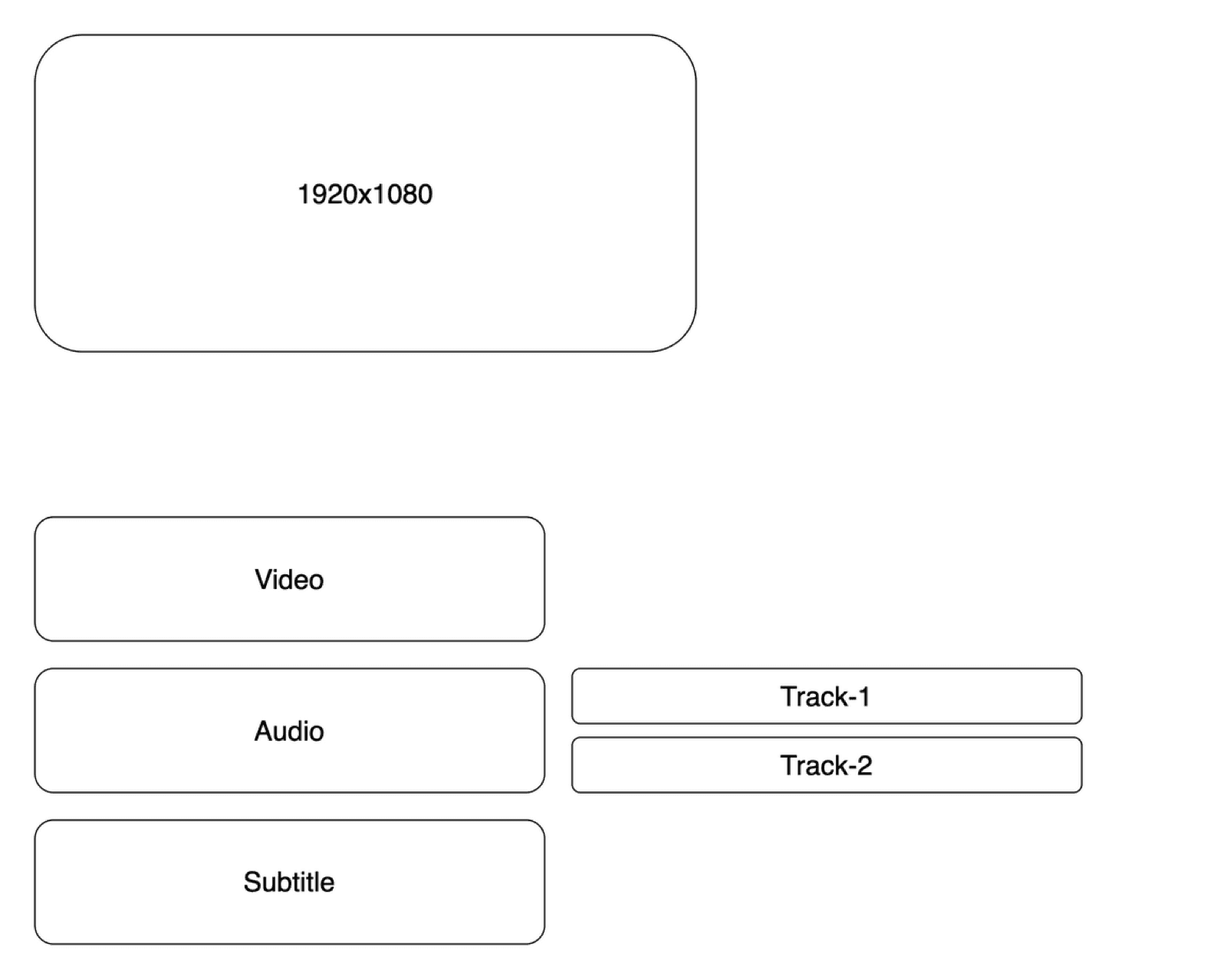
MediaConvert's selectors let you pick which tracks to use. For most apps, the defaults (first video track, default audio) are right.
Anatomy of a MediaConvert job
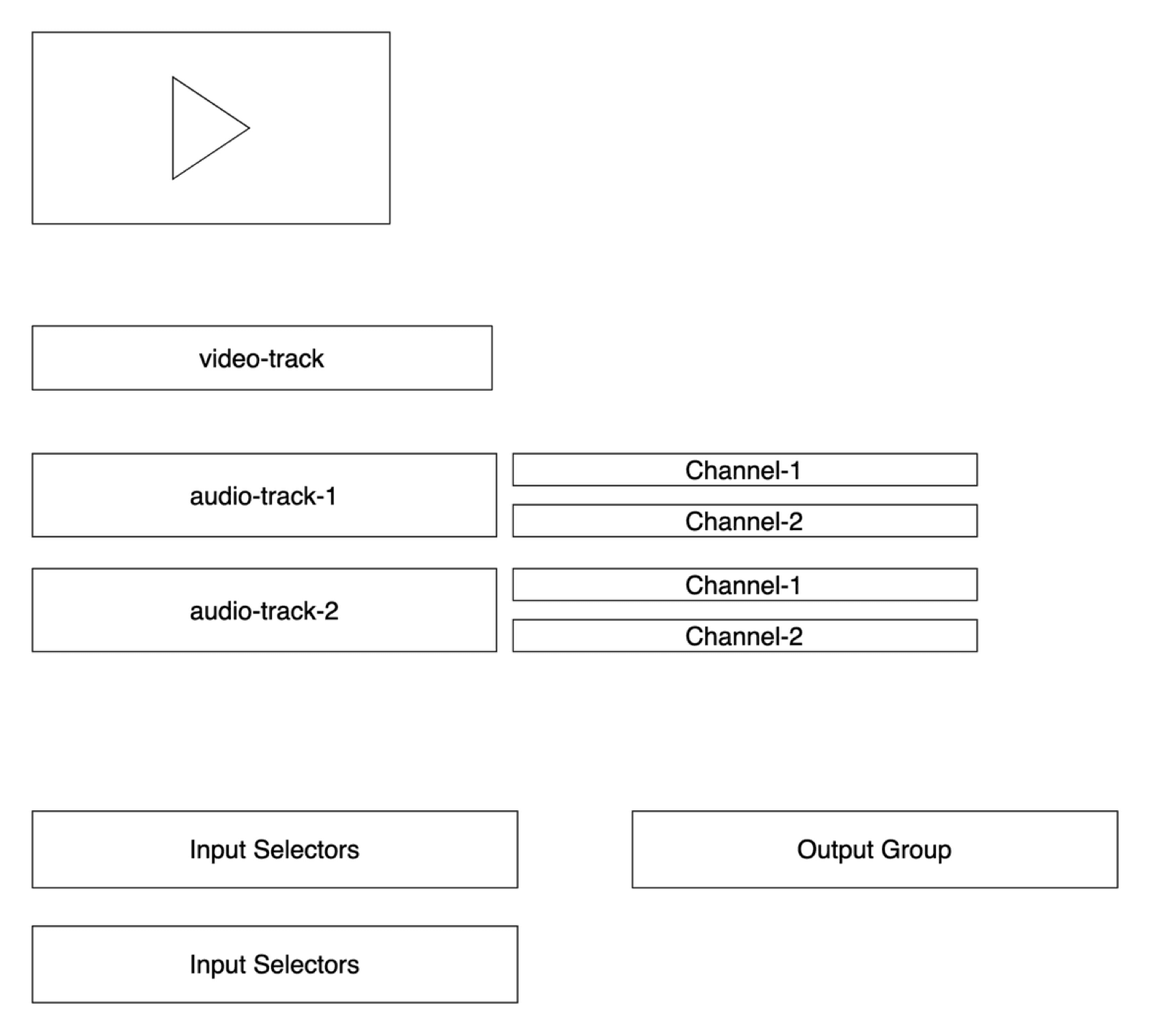
- Inputs: usually one file, by S3 URI (
s3://bucket/key) or HTTPS URL. Multiple inputs can be stitched together. - Output group: a destination plus a type. File group writes plain files like
video_720p.mp4. Streaming groups (HLS, DASH) split video into segments for adaptive streaming. - Outputs: one per rendition, each with codec, resolution and bitrate (or a ready-made preset), plus a name modifier like
_720p. - IAM role: MediaConvert needs a role that can read the input bucket and write to the output bucket. A missing role shows up as a failed job saying it "can't read input stream".
Create a job from Lambda
The course wraps the SDK call in a small class, so the S3 event handler only says which resolutions it wants:
import { CreateJobCommand, MediaConvertClient } from "@aws-sdk/client-mediaconvert";

export class VideoConverter {
  private resolutions: Resolution[] = [];
  constructor(private config: VideoConverterConfig) {}

  addResolution(res: Resolution) {
    this.resolutions.push(res);
  }

  async convert() {
    const client = new MediaConvertClient({ region: this.config.region, endpoint: this.config.endpoint });
    return client.send(new CreateJobCommand({
      Role: this.config.roleArn,
      UserMetadata: this.config.userMetadata,          // e.g. { id: videoId }
      Settings: {
        TimecodeConfig: { Source: "ZEROBASED" },
        Inputs: [{
          FileInput: this.config.inputFile,              // s3://upload-bucket/<id>
          AudioSelectors: { "Audio Selector 1": { DefaultSelection: "DEFAULT" } },
          VideoSelector: {},
          TimecodeSource: "ZEROBASED",
        }],
        OutputGroups: [{
          OutputGroupSettings: {
            Type: "FILE_GROUP_SETTINGS",
            FileGroupSettings: { Destination: this.config.outputFile }, // s3://stream-bucket/<id>
          },
          Outputs: this.resolutions.map((res) => ({
            ContainerSettings: { Container: "MP4", Mp4Settings: {} },
            VideoDescription: {
              Width: res.width,
              Height: res.height,
              CodecSettings: {
                Codec: "H_264",
                H264Settings: { Bitrate: res.bitRate || 500000, RateControlMode: "CBR" },
              },
            },
            Extension: res.fileExtension || "mp4",
            NameModifier: res.nameExtension || `_${res.width}x${res.height}`,
          })),
        }],
      },
    }));
  }
}
Usage, after reading the upload's resolution with MediaInfo:
if (metadata.width >= 1280) videoConverter.addResolution({ width: 1280, height: 720, bitRate: 500000, nameExtension: "_720p" });
if (metadata.width >= 640)  videoConverter.addResolution({ width: 640,  height: 360, bitRate: 100000, nameExtension: "_360p" });
await videoConverter.convert();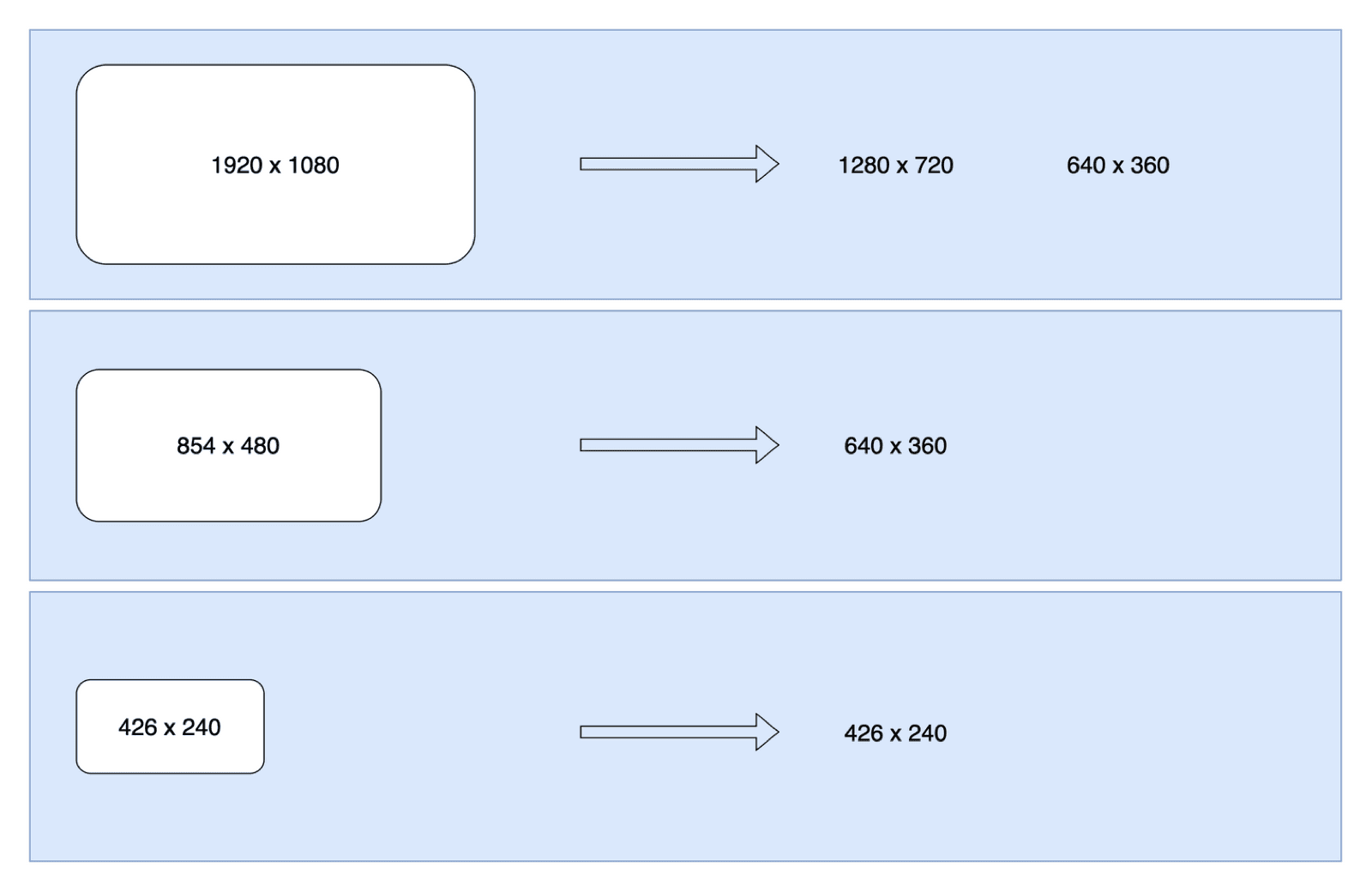
Knowing when it's done: EventBridge
CreateJobCommand returns immediately; the job runs for seconds or minutes. You could poll GetJob... or let AWS tell you.
MediaConvert publishes job state change events (PROGRESSING, COMPLETE, ERROR, CANCELED) to Amazon EventBridge, the account's event bus. You create a rule that matches the events you care about and routes them to a target, like a Lambda.
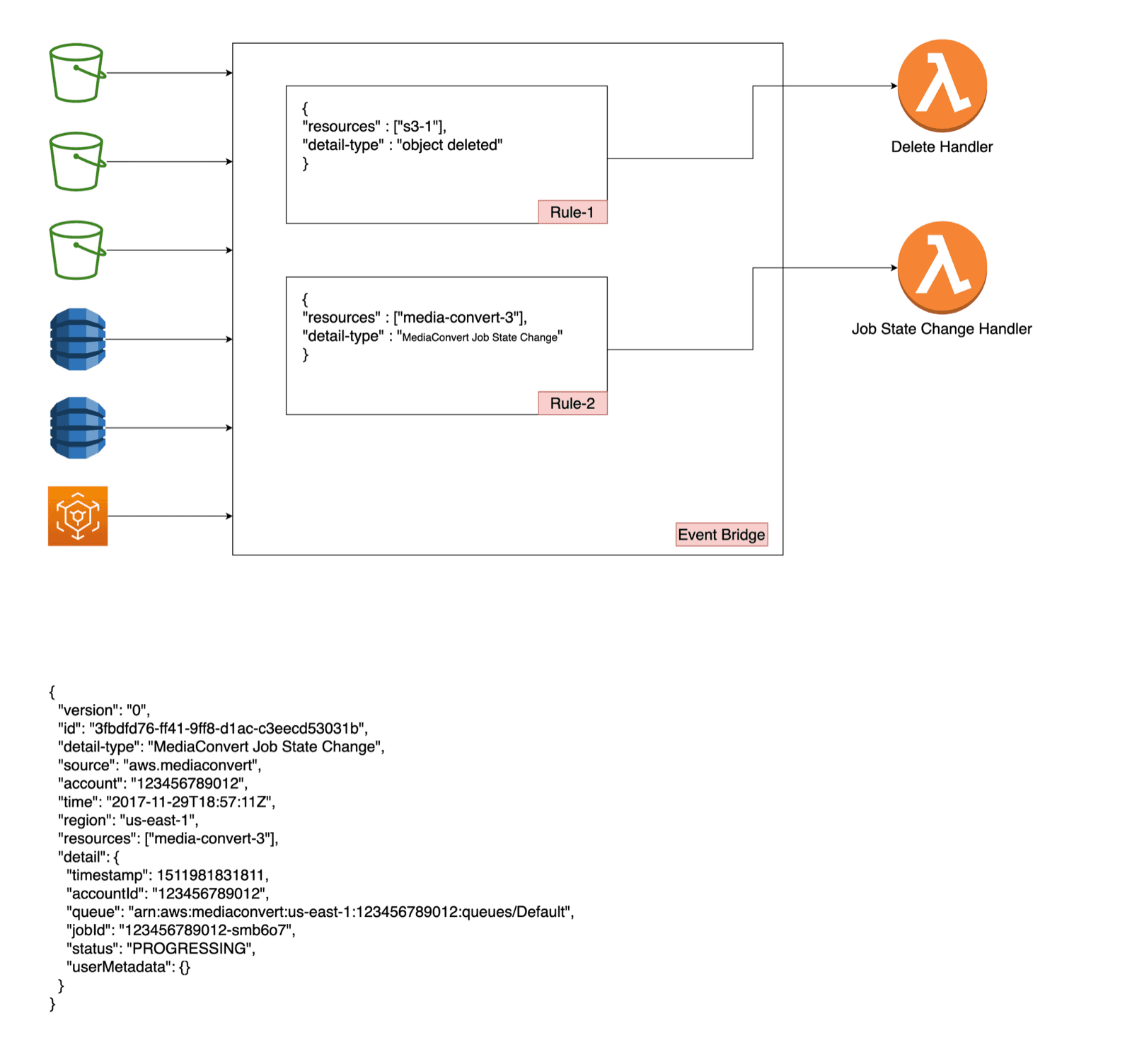
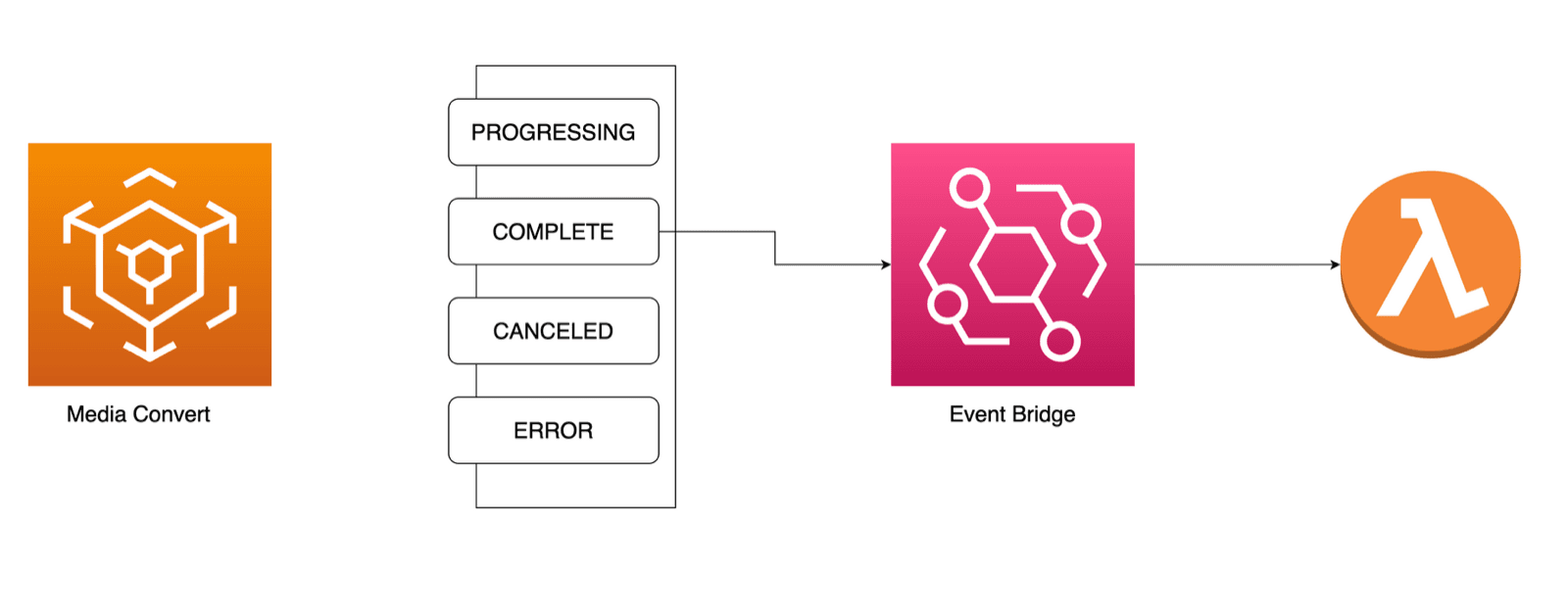
The rule, in CDK:
import * as event from "aws-cdk-lib/aws-events";
import * as eventTarget from "aws-cdk-lib/aws-events-targets";

new event.Rule(this, "MediaConvertJobStateChangeRule", {
  eventPattern: {
    source: ["aws.mediaconvert"],
    detailType: ["MediaConvert Job State Change"],
    detail: { status: ["ERROR", "COMPLETE", "PROGRESSING"] },
  },
  targets: [new eventTarget.LambdaFunction(mediaConvertEventHandler)],
});The handler: update status, clean up, index
import { EventBridgeHandler } from "aws-lambda";

export const handler: EventBridgeHandler<"", {
  status: "PROGRESSING" | "COMPLETE" | "ERROR";
  userMetadata: { id: string };
}, any> = async (e) => {
  const id = e.detail.userMetadata.id;
  switch (e.detail.status) {
    case "PROGRESSING":
      await videoDb.update({ id, attrs: { status: "PROCESSING" } });
      break;
    case "COMPLETE":
      await videoDb.update({ id, attrs: { status: "READY" } });
      await uploadBucket.deleteObject(id);                 // raw upload no longer needed
      await videoIndex.putVideo(await videoDb.get(id));    // make it searchable
      break;
    case "ERROR":
      await videoDb.update({ id, attrs: { status: "ERROR" } });
      await uploadBucket.deleteObject(id);
      break;
  }
};
Three nice properties fall out of this design:
- The status lifecycle is honest.
UPLOADED→PROCESSING→READY(orERROR) reflects what MediaConvert actually did. - Storage stays lean. The raw upload is deleted once the streamable versions exist.
- Search only shows playable videos, because indexing happens on
COMPLETE. More in Full-text search with OpenSearch.
IAM for MediaConvert in CDK
const mediaConvertRole = new iam.Role(this, "MediaConvertRole", {
  assumedBy: new iam.ServicePrincipal("mediaconvert.amazonaws.com"),
});
uploadBucket.grantRead(mediaConvertRole);
streamBucket.grantWrite(mediaConvertRole);
The Lambda that creates jobs also needs permission to call mediaconvert:CreateJob and to pass that role (iam:PassRole) to MediaConvert.
Key takeaways
- ✓MediaConvert is managed transcoding: inputs, an output group, one output per rendition.
- ✓Start from a console job's JSON, then send it with CreateJobCommand.
- ✓Put your own ID in UserMetadata so job events can be matched to your records.
- ✓An EventBridge rule on 'MediaConvert Job State Change' replaces polling.
- ✓MediaConvert needs a role that can read input and write output; your Lambda needs iam:PassRole for it.
See the full pipeline built
This is the heart of VidShare: a serverless video platform on AWS with presigned uploads, S3 events, MediaInfo, MediaConvert, EventBridge, DynamoDB and OpenSearch, in TypeScript with Jest tests and CDK. 109 lessons, lifetime access. Start with the free architecture lesson.