
People use "terminal", "shell", "console" and "command line" as if they were the same thing. They are related, but they are different pieces, and the difference explains a lot: why your aliases live in .zshrc, why a Bash script fails in PowerShell, and why servers are managed the way they are.
The clearest way to understand it is the way it actually happened.
Why it's called a "terminal"
Think of a bus terminal: the place you go to get access to the bus. A computer terminal is the place you go to get access to the computer.
In the 1950s computers filled whole rooms. There were no keyboards or screens for regular users. Say a professor wanted to generate grade cards for 100 students. They'd prepare 100 punch cards, hand them to a technician, who would wait to collect a batch of cards from other people, then feed them into the computer. If one card had a mistake, the whole loop started again.
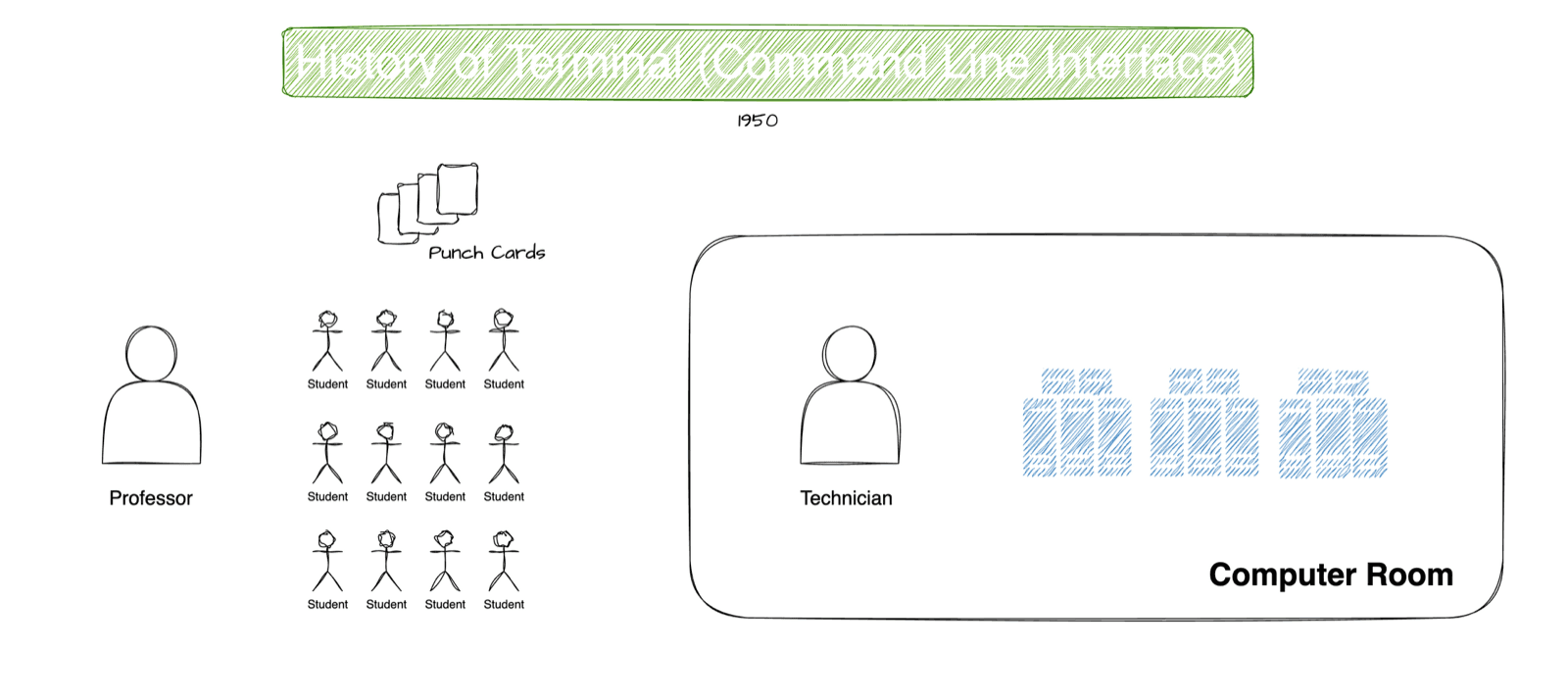
Around the 1960s the terminal removed the middleman: a keyboard-like input device plus a screen (or printer), wired directly to the computer. Type a command, see the result immediately. One big computer could have many terminals, one for maths, one for chemistry.
So originally, a terminal was a physical device. Today it's an app that emulates that device: a terminal emulator.
The shell: the layer that understands you
Computers only understand binary. You type commands in something close to English. Something has to interpret them. That something is the shell.
Picture the computer in layers, like an egg:
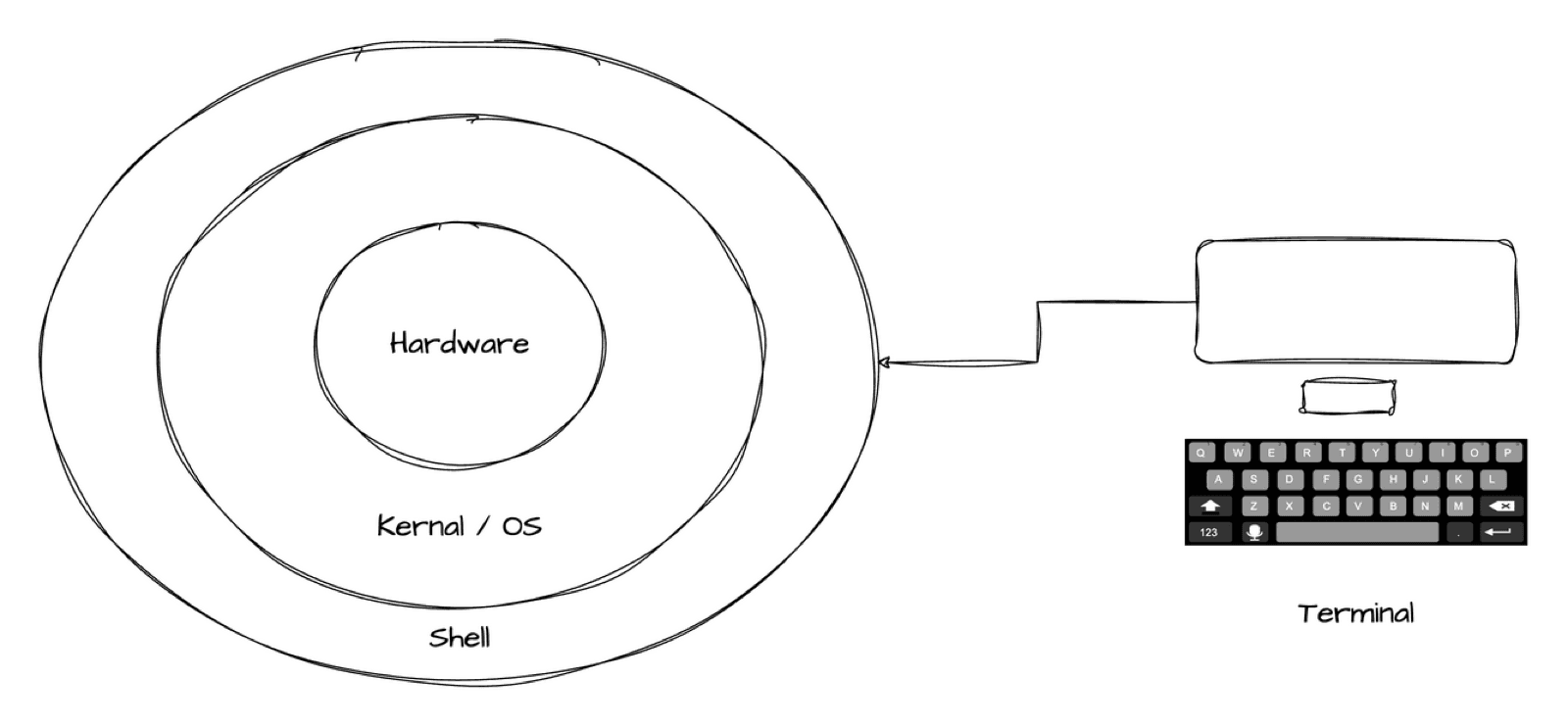
- Hardware: CPU, disk, memory.
- Kernel: the core of the operating system, which controls the hardware.
- Shell: the outermost layer. It reads your command, works out what you mean, and asks the kernel to do it.
- Terminal: the window you type into. It passes keystrokes to the shell and draws whatever comes back.
When you type ls and press Enter: the terminal sends ls to the shell, the shell interprets it and asks the operating system to list the directory, and the result travels back to the terminal to be displayed.
Which terminal and shell does your OS use?
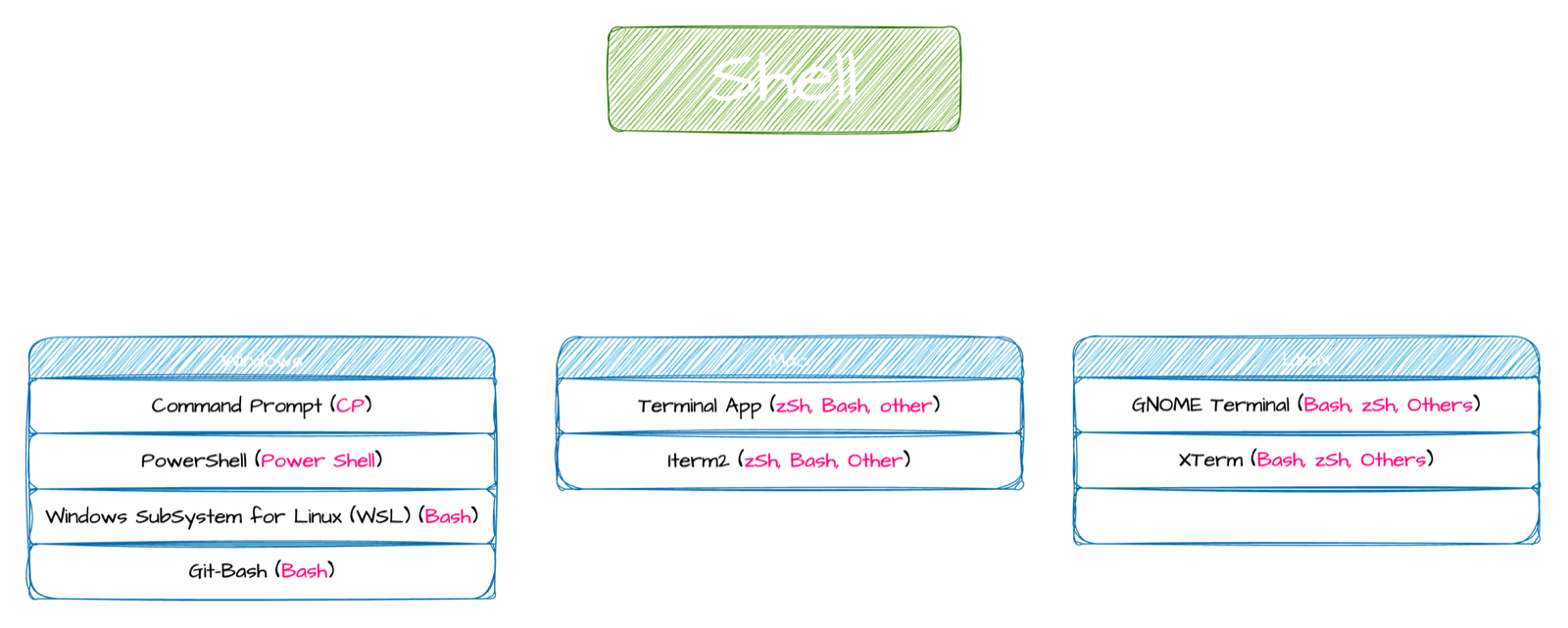
| OS | Terminal emulators | Shell inside |
|---|---|---|
| Windows | Command Prompt, PowerShell | Command Prompt, PowerShell |
| Windows | WSL, Git Bash | Bash |
| macOS | Terminal app, iTerm2 | Zsh by default (Bash before Catalina) |
| Linux | GNOME Terminal, XTerm, Konsole | Bash by default |
One terminal can run different shells. Check yours, and switch inside the same window:
Same window, different interpreter. That's the clearest proof the two are separate.
Why developers choose Bash or Zsh
In 1969, Ken Thompson and Dennis Ritchie created Unix at Bell Labs, a portable operating system instead of one per hardware vendor. Ritchie created the C language in 1972 largely to write it.
From there, two families grew:
Unix family
- ▸macOS (built on BSD Unix)
- ▸Linux (Linus Torvalds' open-source rewrite, 1991)
- ▸Android, servers, cloud, routers, cars
- ▸Shells: Bash, Zsh
MS-DOS family
- ▸Windows (graphical layer on MS-DOS roots)
- ▸Great for office and business software
- ▸Shells: Command Prompt, PowerShell
- ▸Different commands and conventions
Almost every server, cloud machine and container you will touch as a developer runs Linux, and its default shell is Bash. macOS's Zsh is nearly identical for everyday work. So learning Bash-style commands means the same skills work on your laptop, on AWS, in Docker and in CI pipelines.
On Windows, use WSL or Git Bash to get the same experience.
Why this matters in practice
- Config belongs to the shell, not the terminal app. Aliases and prompt changes go in
~/.zshrc(Zsh) or~/.bashrc(Bash). Switching from Terminal to iTerm2 changes nothing. - Scripts name their shell with a first line like
#!/bin/bash. More in Shell scripting for beginners. - Tutorials assume a shell. If a command fails, check whether it was written for Bash and you're in PowerShell.
Key takeaways
- ✓Terminal = the window (once a physical device). Shell = the program that interprets your commands.
- ✓Layers: hardware → kernel → shell → terminal.
- ✓Linux defaults to Bash, macOS to Zsh, Windows to PowerShell (use WSL or Git Bash for Bash).
- ✓Learn Bash-style commands and the same skills work on servers, cloud and containers.
Learn the terminal properly, once
CLI Mastery is 57 short lessons that take you from "what is a shell" to scripting and running a web server on AWS. Every idea is drawn first, then done live. Lifetime access, and three lessons are free to watch.