
You set a variable in your terminal, run a script that uses it, and the script prints nothing. You restart the terminal, and the variable is gone. Both are normal, and both are explained by one distinction: a shell variable versus an environment variable, and the keyword export that turns one into the other.
Shell variables
A variable is a name that holds a value. In Bash and Zsh you assign with =, with no spaces around it, and read with a $:
This variable belongs to your current shell only. If you write city = Kolkata with spaces, the shell tries to run a command called city, and you get "command not found".
Environment variables
An environment variable is a variable that is handed on to the programs your shell starts. Programs and scripts read them to find out about their surroundings. You have already used some:
PATH, the list of folders where the shell looks for commands, is the most important one (see How the shell finds commands). List all of them with env or printenv, or ask for one with printenv HOME.
The difference, in one experiment
Write a tiny script that tries to use a variable:
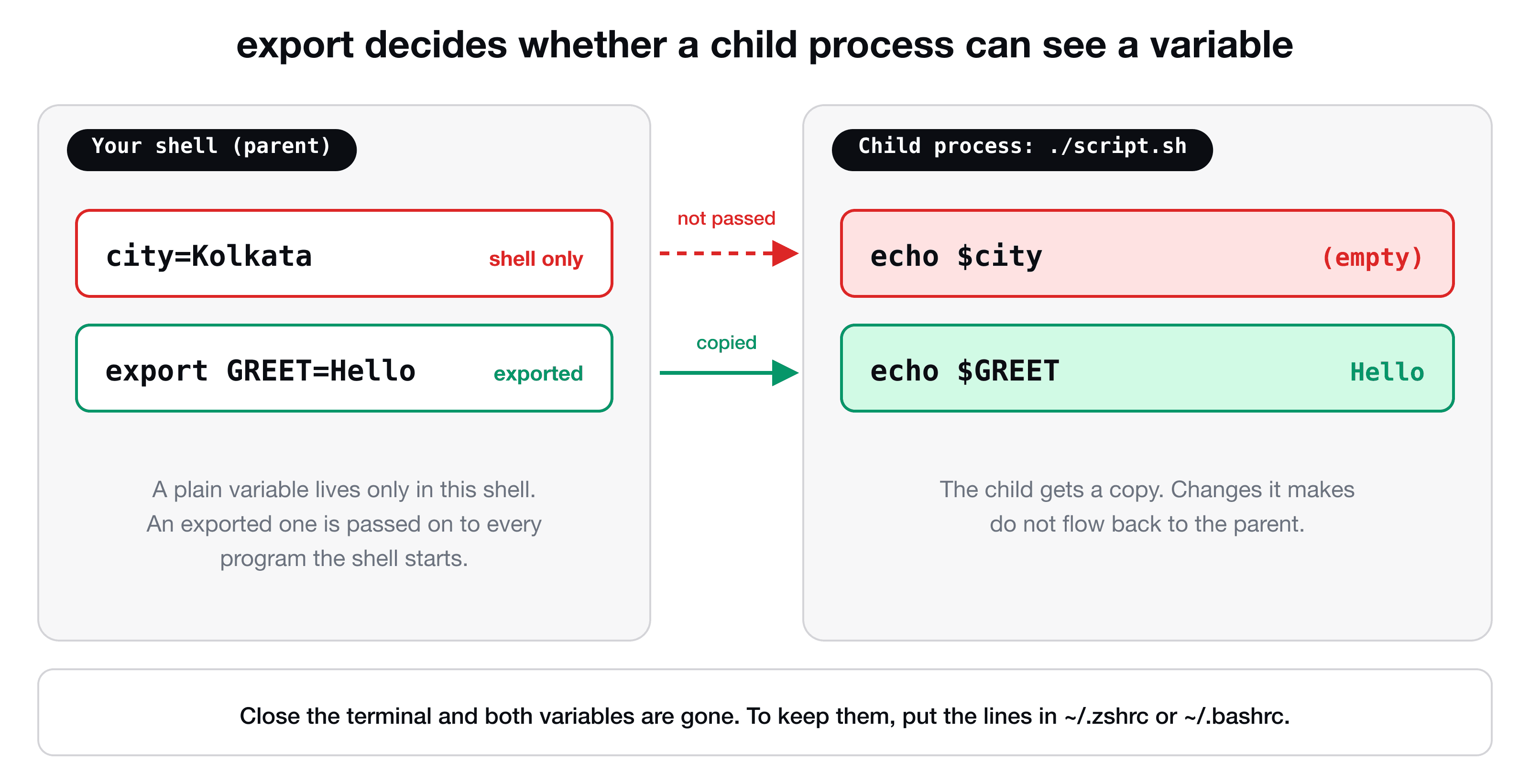
Both are empty. A script runs in a child process, a new program started by your shell, and a plain variable does not travel into it. Now export one:
GREET arrived because it was exported. city did not, because it was not.
You can also do both in one line, or export one that already exists:
export GREET=Hello     # assign and export
city=Kolkata
export city            # export an existing variable
Two details worth knowing:
- The child gets a copy. If the script changes
GREET, your shell's value is unchanged. - To pass a variable to just one command without exporting it, put it in front:
GREET=Hi ./greet.sh. It exists only for that run.
They disappear when you close the terminal
Variables live as long as the shell session. Open a new terminal window and GREET is gone, and so is any alias you defined. To keep them, put the lines in your shell's configuration file, which runs every time a shell starts: ~/.zshrc for Zsh (the default on modern macOS), ~/.bashrc for Bash on Linux. For example:
export EDITOR=nano
export PATH="$HOME/bin:$PATH"
alias ll="ls -lh"
The last lines of those examples show the most common real use of export: adding a folder to PATH. Note the quotes and the :$PATH at the end: you are building a new list that starts with your folder and keeps the old one. After editing the file, apply it to the current session with source ~/.zshrc. The files, aliases and the prompt are covered in Customize your shell.
To remove a variable, use unset GREET.
Quotes matter
name="Shobhan Biswas"      # quotes: the value has a space
echo "Hello $name"         # double quotes: $name is replaced by its value
echo 'Hello $name'         # single quotes: printed literally, no replacement
Always quote "$variable" when you use it, so a value with spaces stays one argument.
What is eval?
eval takes a string, treats it as a command line, and runs it. The shell first expands the string, and then eval executes the result. You see it in setup instructions:
eval "$(ssh-agent -s)"
eval "$(/opt/homebrew/bin/brew shellenv)"
Here, the program in $(...) prints shell commands (such as export PATH=...), and eval runs them in your current shell. That is the whole trick: a program cannot change its parent shell's variables directly, but it can print the commands that do, and eval applies them.
A smaller example shows the idea:
Cheat sheet
| Goal | Command |
|---|---|
| Set a shell variable | name=value (no spaces) |
| Read it | echo "$name" |
| Make it visible to child processes | export name or export name=value |
| Use it for one command only | name=value ./script.sh |
| List environment variables | env or printenv |
| Remove it | unset name |
| Keep it across sessions | Add the line to ~/.zshrc or ~/.bashrc |
Key takeaways
- ✓A shell variable exists only in the current shell. An exported (environment) variable is also copied into every program the shell starts.
- ✓A script cannot see a variable until you export it, or you set it for one run with name=value ./script.
- ✓Variables and aliases vanish with the terminal. Put them in ~/.zshrc or ~/.bashrc to keep them.
- ✓eval runs a string as a command in the current shell. It is used with trusted output such as ssh-agent and brew shellenv.
- ✓Never eval untrusted input.
Make your own environment
Knowing how variables flow is the base of shell scripting and of every deployment config. CLI Mastery covers it together with scripts, configuration files, the prompt and a real server on AWS. 57 lessons, lifetime access. Start with the free lesson on terminals and shells.